
介绍
Webassembly (wasm): 可以将 c/c++, rust 等源码编译成浏览器能直接运行的二进制文件,并且还能直接在 javascript 中直接运行。
Webassembly 不能替代 Javascript,相反,这两种技术是相辅相成的。通过 JavaScript API,你可以将 Webassembly模块加载到你的页面中。也就是说,你可以通过 Webassembly来充分利用编译代码的性能,同时保持 JavaScript 的灵活性。
Emscripten
利用 Emscripten
工具包,可以直接将 c/c++ 源码编译成 Webassembly 项目。
Terminal
$git clone https://github.com/emscripten-core/emsdk.git# 下载项目
$cd emsdk
$./emsdk install latest# 下载最新版本
1. emsdk 文件
./emsdk 就是用于查找本地 python 的脚本
./emsdk install latest 等价于 python3 emsdk.py install latest
2. 安装需要挂梯子
$./emsdk activate latest# 激活版本
$source ./emsdk_env.sh# 添加环境变量
1. emsdk_env.sh 中的换行符号可能是 CRFL ,需要替换成 FL,否则 Linux 无法执行
2. source ./emsdk_env.sh 只对当前终端有效,另开终端得重新执行
使用
Hello
c代码
#include <stdio.h>
int main(int argc, char ** argv) {
  printf("Hello World\n");
}
#include <stdio.h>
int main(int argc, char ** argv) {
printf("Hello World\n");
}
- 编译项目
Terminal
$emcc hello.c -s WASM=1 -o hello.html
-s WASM=1 : 以 wasm 形式输出
$tree
.
├── hello.c # c 代码
├── hello.html # 模板界面
├── hello.js # 在原生 C 函数和 JavaScript/wasm 之间转换的胶水代码
└── hello.wasm # 二进制的 wasm 模块代码
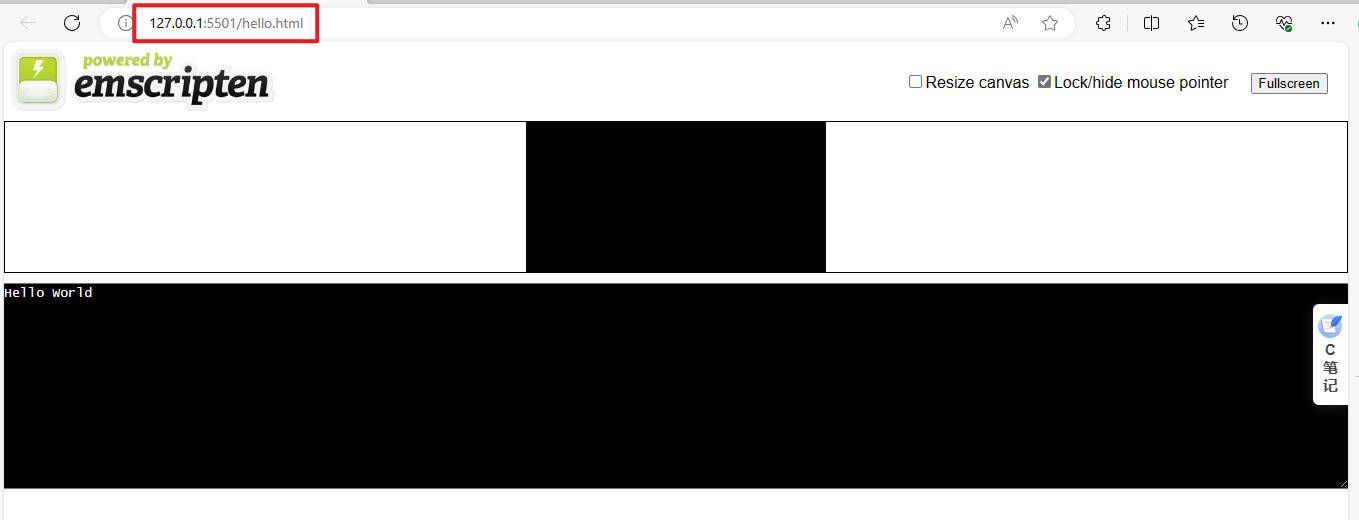
- 预览结果
Note
启用服务预览 hello.html ,不能直接打开 hello.html。vscode 可以使用 Live Server
快速预览。
模板文件
通过 emcc 编译生成的 hello.html 是有一个默认模板文件 shell_minimal.html (可以在 emsdk 文件夹下搜索出来)。这个模板文件可以自定义
Terminal
$emcc -o hello2.html hello2.c -O3 -s WASM=1 --shell-file html_template/shell_minimal.html
--shell-file html_template/shell_minimal.html : 指定自定义模板文件
也可以不提供 .html 模板文件,直接生成 .js 文件
Terminal
$emcc hello.c -s WASM=1 -o hello.js
c 接口导出
c代码
// sum.c
#include <stdio.h>
#include <stdlib.h>
#include <emscripten.h>

// NOTE - js 在 wasm 中是按照 c 风格接口形式查找函数
#ifdef __cplusplus
extern "C" {
#endif

// EMSCRIPTEN_KEEPALIVE : 声明需要导出的接口
EMSCRIPTEN_KEEPALIVE int sum(int x, int y)
{
  return x + y;
}

// 默认只会导出 main
int main(int x)
{
   return sum(x,x);
}

#ifdef __cplusplus
}
#endif
// sum.c
#include <stdio.h>
#include <stdlib.h>
#include <emscripten.h>
// NOTE - js 在 wasm 中是按照 c 风格接口形式查找函数
#ifdef __cplusplus
extern "C" {
#endif
// EMSCRIPTEN_KEEPALIVE : 声明需要导出的接口
EMSCRIPTEN_KEEPALIVE int sum(int x, int y)
{
return x + y;
}
// 默认只会导出 main
int main(int x)
{
return sum(x,x);
}
#ifdef __cplusplus
}
#endif
- 编译
wasm
Terminal
$emcc hello.c -o sum.js -s EXPORTED_FUNCTIONS=_main,_sum -s WASM=1
EXPORTED_FUNCTIONS=_main,_sum: 指定需要导出的接口名,_xxx,c语言函数接口风格
js中加载wasm
// 待加载的 wasm 文件
fetch("sum.wasm")
    .then((response) => response.arrayBuffer())
    .then((bytes) => Webassembly.compile(bytes))
    .then((module) => {
        // 生成实例
        const instance = new Webassembly.Instance(module);
        // 导出的接口集合
        const api = instance.exports;
        // 调用接口
        var result = api.sum(3,2);
    });
// 待加载的 wasm 文件
fetch("sum.wasm")
.then((response) => response.arrayBuffer())
.then((bytes) => Webassembly.compile(bytes))
.then((module) => {
// 生成实例
const instance = new Webassembly.Instance(module);
// 导出的接口集合
const api = instance.exports;
// 调用接口
var result = api.sum(3,2);
});
C++ 接口导出
c++代码
#include <emscripten/bind.h>
using namespace emscripten;
struct Point {
    int x;
    int y;
};

Point getPoint() {
    Point point = {0};
       point.x = 100;
       point.x = 200;
       return point;
}

EMSCRIPTEN_BINDINGS(my_module) {
    // 绑定结构体
    value_object<Point>("Point")
        .field("x", & Point::x)
        .field("y", & Point::y)
        ;

    // 绑定 c++ 函数
   function("_getPoint", &getPoint);
}
#include <emscripten/bind.h>
using namespace emscripten;
struct Point {
int x;
int y;
};
Point getPoint() {
Point point = {0};
point.x = 100;
point.x = 200;
return point;
}
EMSCRIPTEN_BINDINGS(my_module) {
// 绑定结构体
value_object<Point>("Point")
.field("x", & Point::x)
.field("y", & Point::y)
;
// 绑定 c++ 函数
function("_getPoint", &getPoint);
}
- 编译
Terminal
$emcc --bind main.cpp -s WASM=1
# --bind : 启动绑定
- 调用
<!-- 添加 js -->
<script src="a.out.js"></script>

<script>
    // 等待 Module 加载完毕
    Module.onRuntimeInitialized = ()=>{
        // 直接调用接口
        var p = Module._getPoint();
        console.log(p.x);
        console.log(p.y);
    }
</script>
<!-- 添加 js -->
<script src="a.out.js"></script>
<script>
// 等待 Module 加载完毕
Module.onRuntimeInitialized = ()=>{
// 直接调用接口
var p = Module._getPoint();
console.log(p.x);
console.log(p.y);
}
</script>
调试
- 教程: 使用现代工具调试 WebAssembly
- 浏览器调试工具: C/C++ DevTools Support (DWARF)
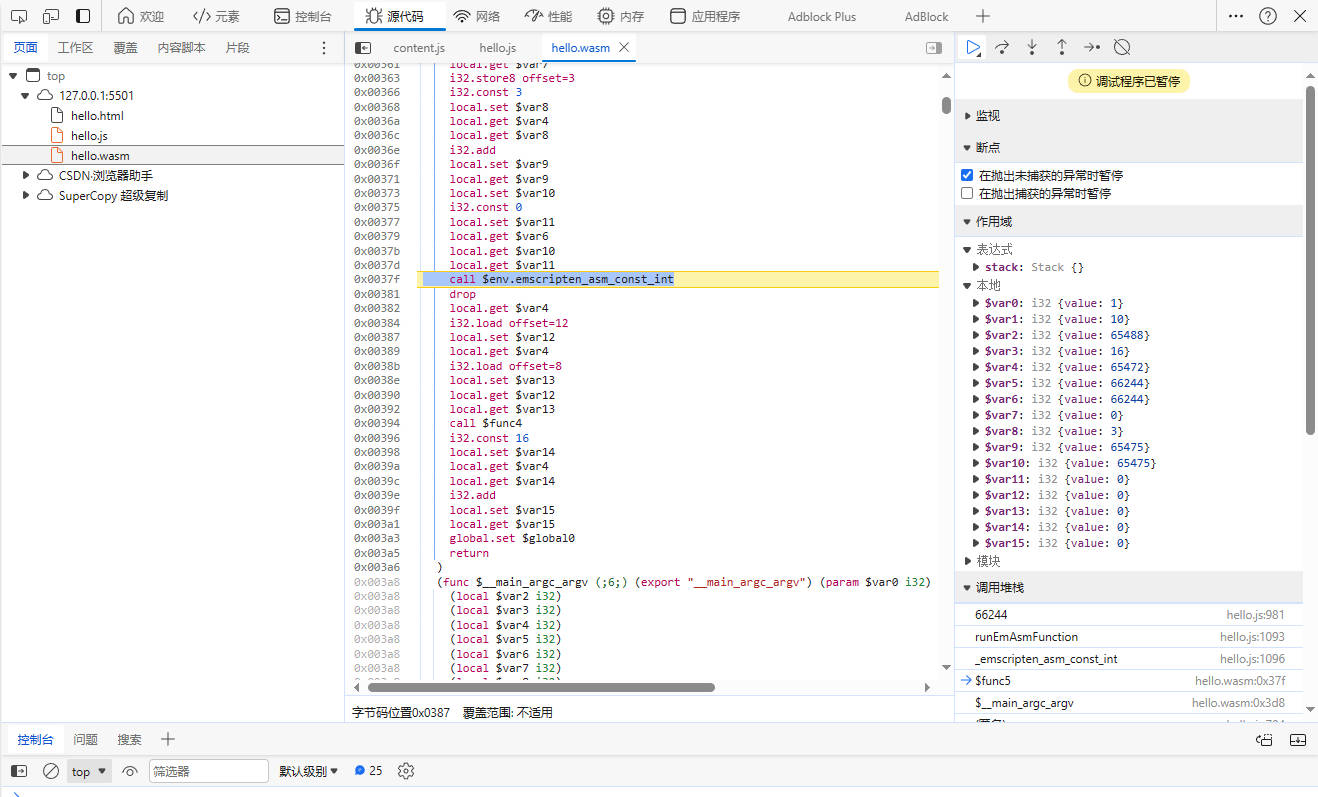
汇编调试
安装好插件后,可以直接在汇编中打断点调试。
#include <stdio.h>
#include <emscripten.h>

int main(int argc, char ** argv) {
    // 可以在代码中主动设置断点,方便找代码
    EM_ASM({ debugger });
    printf("Hello World\n");
}
#include <stdio.h>
#include <emscripten.h>
int main(int argc, char ** argv) {
// 可以在代码中主动设置断点,方便找代码
EM_ASM({ debugger });
printf("Hello World\n");
}
DWARF
Terminal
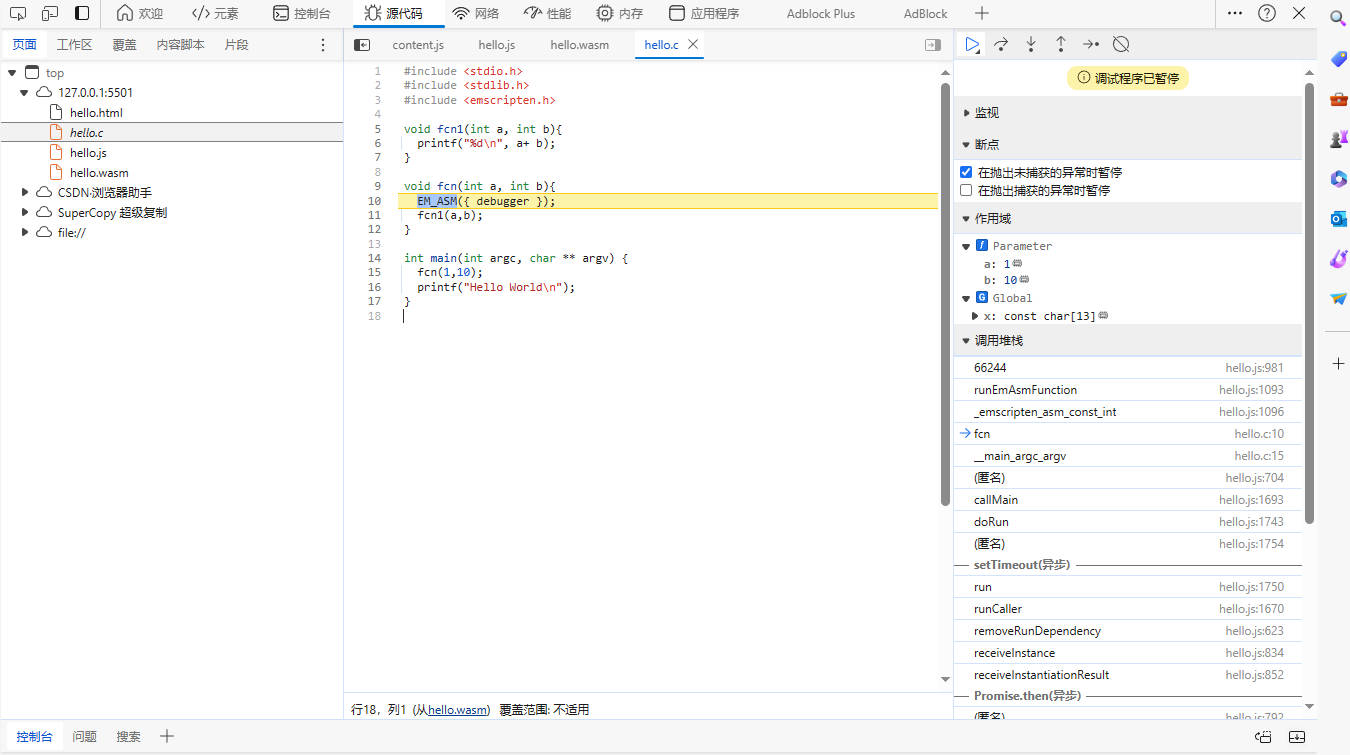
$emcc -g -fdebug-compilation-dir='.' hello.cpp -o hello.html
Options:
-g 生成调试信息
-fdebug-compilation-dir 源码相对于 hello.html 的路径,通过 http 协议加载。若不指定则通过 file:// 协议获取本地源文件
Source Map
Terminal
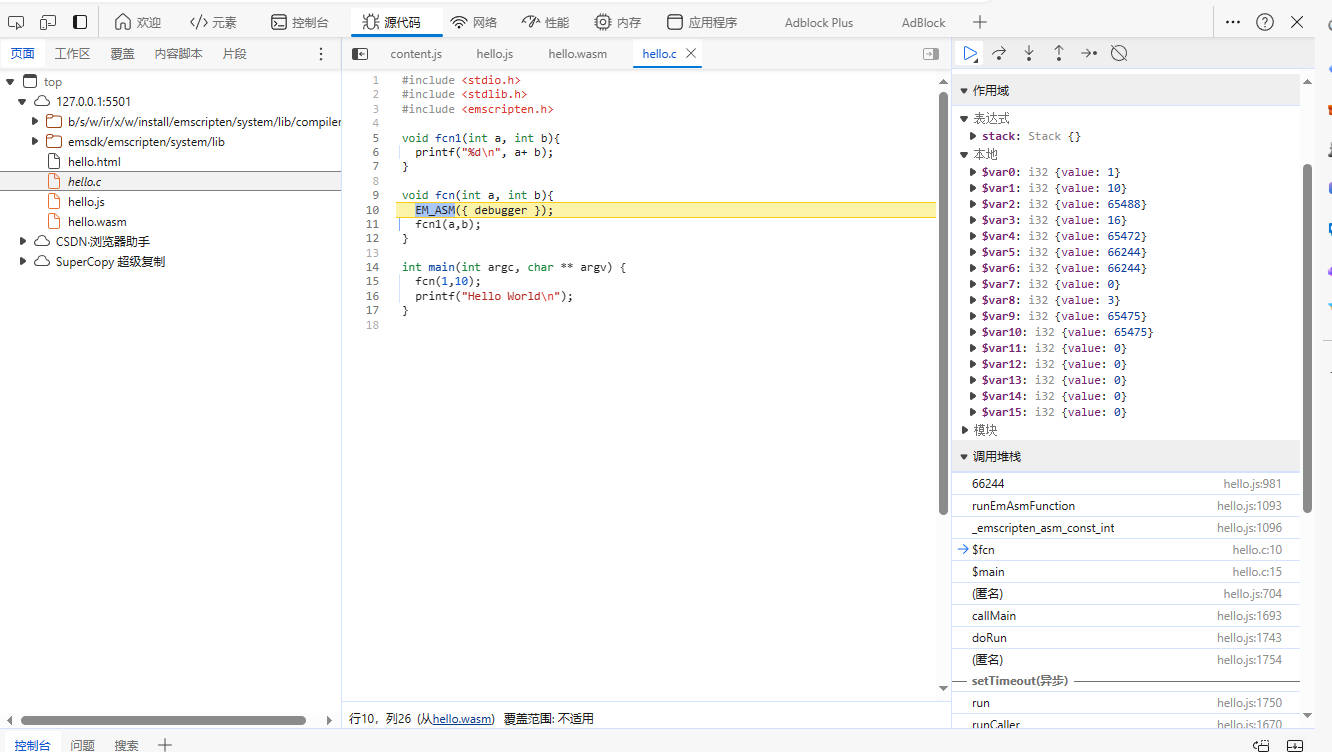
$emcc -gsource-map hello.c -o hello.html
Options:
-gsource-map 会生成 wasm 文件对应源码的映射文件
-g4 效果同上,新版 emscripten 不推荐使用
$tree
.
├── hello.c
├── hello.html
├── hello.js
├── hello.wasm
└── hello.wasm.map # 源码映射文件
Note
Source Map 只是将汇编对应到源码,堆栈还是展示汇编寄存器