搭建工具

方案

k8s 针对用途,有多种构建方式

  • kubeadm : 主流部署方式,用于生产环境
  • minikube: 一般用于本地开发、测试和学习,不能用于生产环境
  • docker desktop : 傻瓜式构建方案
    • 通过 kubeadm 构建一个「单节点集群」,用于测试与学习
    • 通过 kind 构建「多节点集群」
  • 二进制安装:从官网下载二进制包,全手动安装,排查问题方便,可用于生产环境

docker desktop

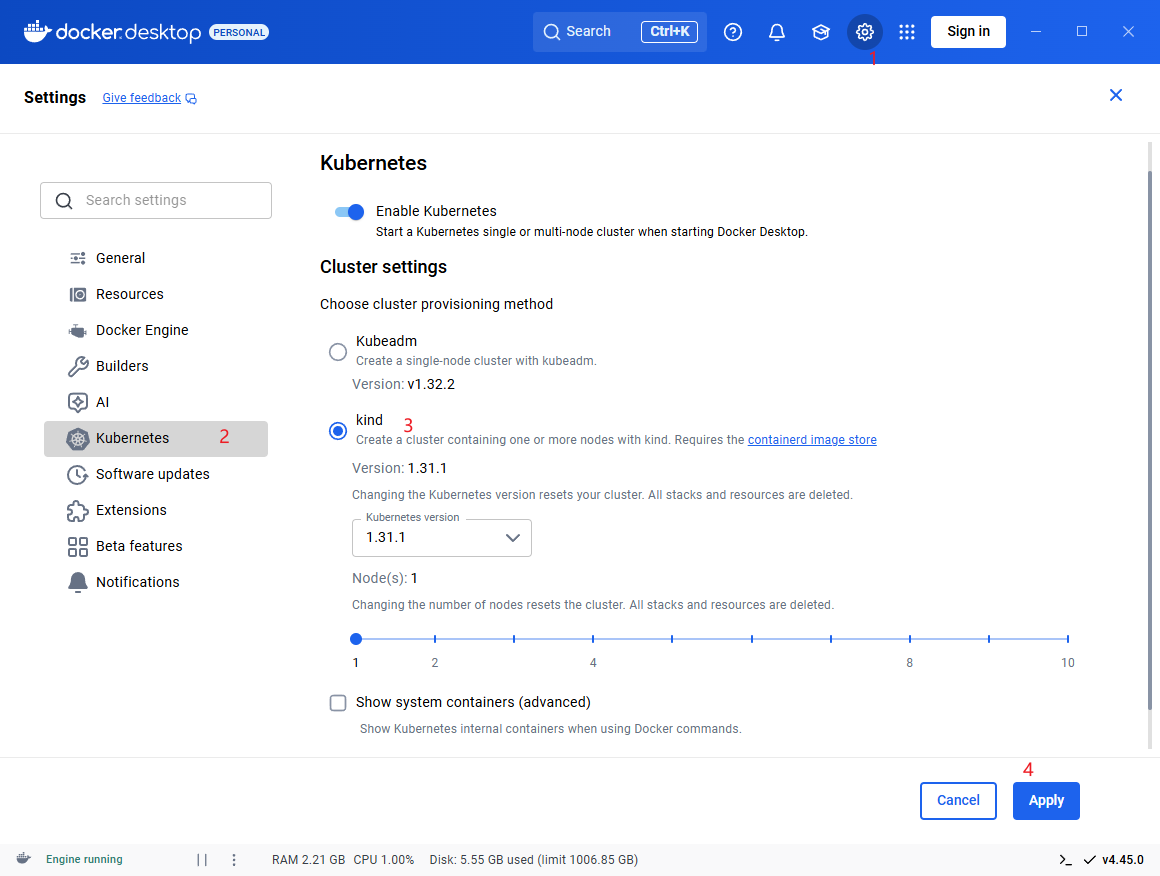
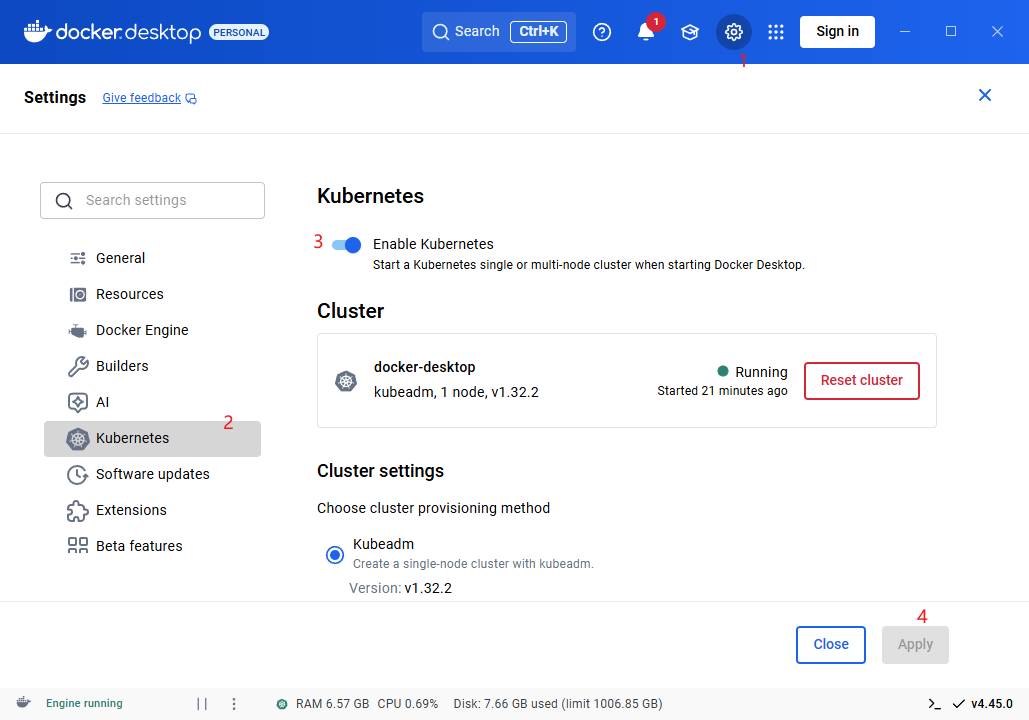
单节点

使用 docker desktop 自动通过 kubeadm 部署一个 单节点 的 k8s 集群,且自动安装 kubectl
alt

多节点

alt

minikube

简介

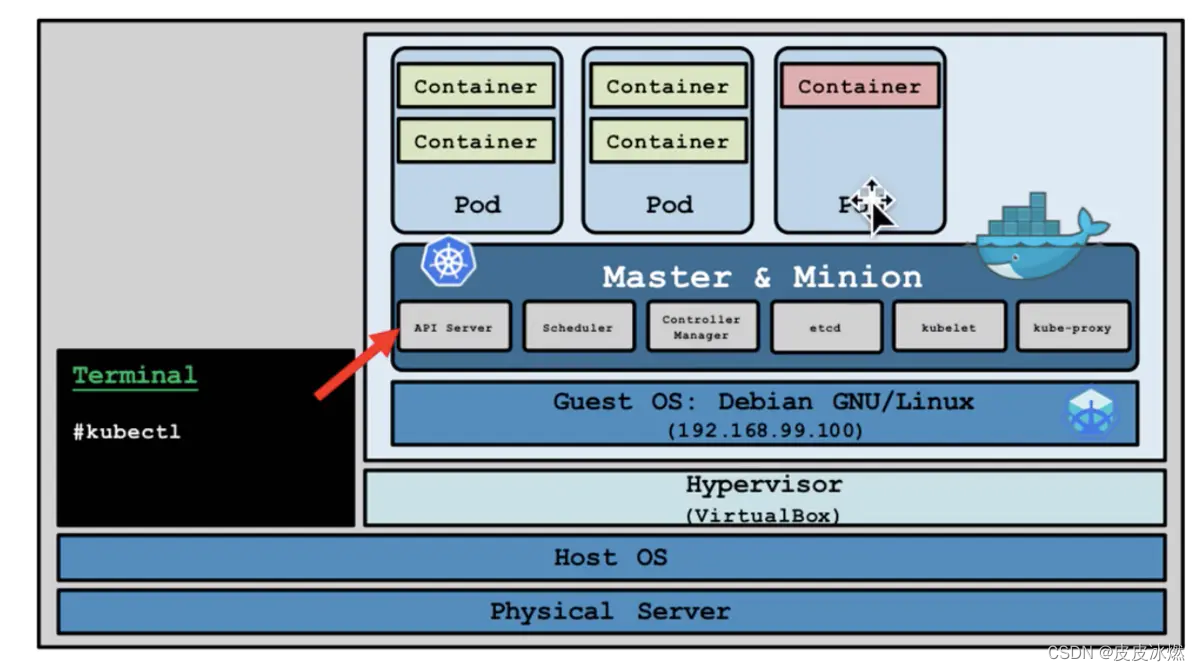
(minikube)[https://minikube.kubernetes.ac.cn/docs/] : 是一个基于go语言开发,易于在本地运行 Kubernetes 的工具,可在电脑的虚拟机内轻松创建单机版 Kubernetes 集群,对硬件资源没有太高的要求,非常适合 测试 和 本地开发。

  • 单机器部署:k8s 的所有 Node 均运行在同一台物理机上,即通过本地容器模拟出多机器的效果

alt

安装

根据 minikube 官网描述直接安装

管理命令

Terminal
$minikube start# 启动 k8s 集群 ,并自动安装 k8s
Options
--driver 容器运行时
--image-mirror-country 镜像国家
--image-repository 镜像仓库
--memory 内存占用
--cpus cpu 占用
--kubernetes-version k8s 版本
--nodes 需要模拟的节点数
$minikube stop# 暂停集群
$minikube delete# 删除集群
$minikube status# 查看集群状态
$minikube dashboard# k8s web 管理界面

修改源

Terminal
$minikube ssh# 登录 minikube 模拟的 Node 容器
$sudo vi /etc/docker/daemon.json# 修改镜像地址
$sudo systemctl restart docker# 重启 docker

工具命令

Terminal
$minikube service# 快速实现 k8s 中的 service 功能,实现外部访问集群

节点命令

Terminal
$minikube ip# 获取集群 IP
$minikube ssh# 登录 minikube 模拟的 Node 容器
$minikube node list# 列出所有节点
$minikube node add# 添加一个节点
$minikube node delete <name># 删除指定节点
$minikube node start <name># 启动节点
$minikube node stop <name># 暂停节点

插件

Terminal
$minikube addons list# 查看插件
$minikube addons enable <name># 启动插件
$minikube addons disable <name># 停用插件
$minikube plugin install <name># 安装
$minikube plugin uninstall <name># 卸载

kubeadm

Terminal
$sudo apt install kubelet# 在节点上启动 Pod 和容器的工具
$sudo apt install kubectl# 管理 k8s 集群的工具
$sudo apt install kubeadm# 集群的部署工具

主节点

Terminal
$systemctl enable kubelet# 启动节点
$kubeadm init# 初始化 k8s 集群
Option
--apiserver-advertise-address 主节点 IP
--control-plane-endpoint 主节点的 port
--image-repository docker 镜像仓库
--kubernetes-version k8s 版本
--service-cidr service 的网段
--pod-network-cidr pod 的网段

kubeadm init 安装集群成功后,会提示额外需要执行的命令,依次执行即可

TXT
    ...
Your Kubernetes control-plane has initialized successfully!

To start using your cluster, you need to run the following as a regular user:

  mkdir -p $HOME/.kube
  sudo cp -i /etc/kubernetes/admin.conf $HOME/.kube/config
  sudo chown $(id -u):$(id -g) $HOME/.kube/config

    ...

从节点

Terminal
$kubeadm token list# 在主节点查询 token
TOKEN TTL EXPIRES USAGES DESCRIPTION EXTRA GROUPS
0w3a92.ijgba9ia0e3scicg 23h 2019-09-08T22:02:40+08:00 authentication,signing <none> system:bootstrappers:kubeadm:default-node-token
$# 获取 ca 证书 sha256 编码 hash 值
$openssl x509 -pubkey -in /etc/kubernetes/pki/ca.crt | openssl rsa -pubin -outform der 2>/dev/null | openssl dgst -sha256 -hex | sed 's/^.* //'
ce07a7f5b259961884c55e3ff8784b1eda6f8b5931e6fa2ab0b30b6a4234c09a
$kubeadm join <ip:port> --token <token> --discovery-token-ca-cert-hash <hash># 加入主节点

CNI 插件

Terminal
$kubectl get pod -n kube-system# 系统 pod 没有安装到默认命名空间
NAME READY STATUS RESTARTS AGE
coredns-bccdc95cf-h2ngj 0/1 pending 0 14m
coredns-bccdc95cf-m78lt 0/1 pending 0 14m
etcd-k8s-master 1/1 Running 0 13m
kube-apiserver-k8s-master 1/1 Running 0 13m
kube-controller-manager-k8s-master 1/1 Running 0 13m
kube-flannel-ds-amd64-j774f 1/1 Running 0 9m48s
kube-flannel-ds-amd64-t8785 1/1 Running 0 9m48s
kube-flannel-ds-amd64-wgbtz 1/1 Running 0 9m48s
kube-proxy-ddzdx 1/1 Running 0 14m
kube-proxy-nwhzt 1/1 Running 0 14m
kube-proxy-p64rw 1/1 Running 0 13m
kube-scheduler-k8s-master 1/1 Running 0 13m

通过 kube-system 命名空间查看集群系统的的 pod ,可以发现 coredns 没有自动安装,要想集群运行起来,还要额外手动安装对应的 CNI 网络插件。可选方案有

Terminal
$kubeclt apply -f <xxx.yaml># 安装应用,会自动创建对应 pod

kubectl

简介

kubectl : 使用 Kubernetes API 与 Kubernetes 集群的控制面进行通信的命令行工具。

从节点访问

上述使用 kubeadm 部署真正的多节点集群服务时,只在「主节点」中配置了 $HOME/.kube/config,即只有主节点的 kubectl 才能正确访问到当前集群。要想从节点也能通过 kubectl 访问集群,还需要额外配置

  1. 将主节点的 /etc/kubernetes/admin.conf 拷贝到目标节点 /etc/kubernetes/ 下

  2. 执行以下命令

    Terminal
    triangle@LEARN:~$ sudo cp -i /etc/kubernetes/admin.conf $HOME/.kube/config
    triangle@LEARN:~$ sudo chown $(id -u):$(id -g) $HOME/.kube/config

命令
alt

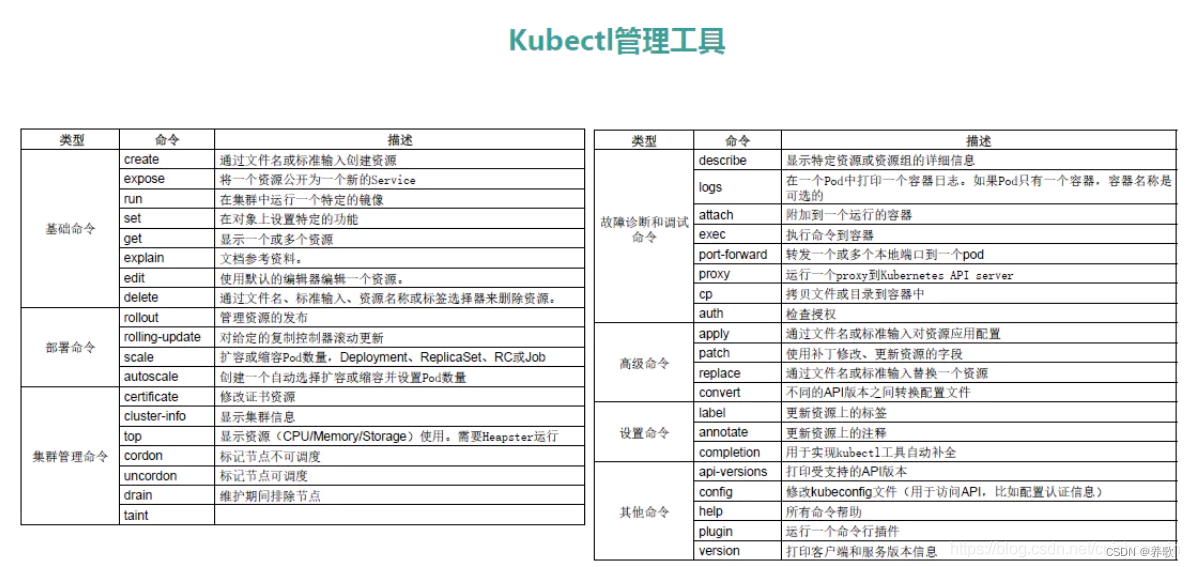
在 kubectl 对会对一些常用资源名进行简写

  • pods -> po
  • deployments -> deploy
  • services -> svc
  • namespace -> ns
  • nodes -> no
  • PersistentVolume -> PV
  • PersistentVolumeClaim -> PVC
Terminal
$kubectl --help
kubectl controls the Kubernetes cluster manager.
Find more information at: https://kubernetes.io/docs/reference/kubectl/
Basic Commands (Beginner):
create Create a resource from a file or from stdin
expose Take a replication controller, service, deployment or pod and expose it as a new Kubernetes service
run Run a particular image on the cluster
set Set specific features on objects
Basic Commands (Intermediate):
explain Get documentation for a resource
get Display one or many resources
edit Edit a resource on the server
delete Delete resources by file names, stdin, resources and names, or by resources and label selector
Deploy Commands:
rollout Manage the rollout of a resource
scale Set a new size for a deployment, replica set, or replication controller
autoscale Auto-scale a deployment, replica set, stateful set, or replication controller
Cluster Management Commands:
certificate Modify certificate resources
cluster-info Display cluster information
top Display resource (CPU/memory) usage
cordon Mark node as unschedulable
uncordon Mark node as schedulable
drain Drain node in preparation for maintenance
taint Update the taints on one or more nodes
Troubleshooting and Debugging Commands:
describe Show details of a specific resource or group of resources
logs Print the logs for a container in a pod
attach Attach to a running container
exec Execute a command in a container
port-forward Forward one or more local ports to a pod
proxy Run a proxy to the Kubernetes API server
cp Copy files and directories to and from containers
auth Inspect authorization
debug Create debugging sessions for troubleshooting workloads and nodes
events List events
Advanced Commands:
diff Diff the live version against a would-be applied version
apply Apply a configuration to a resource by file name or stdin
patch Update fields of a resource
replace Replace a resource by file name or stdin
wait Experimental: Wait for a specific condition on one or many resources
kustomize Build a kustomization target from a directory or URL
Settings Commands:
label Update the labels on a resource
annotate Update the annotations on a resource
completion Output shell completion code for the specified shell (bash, zsh, fish, or powershell)
Subcommands provided by plugins:
Other Commands:
api-resources Print the supported API resources on the server
api-versions Print the supported API versions on the server, in the form of "group/version"
config Modify kubeconfig files
plugin Provides utilities for interacting with plugins
version Print the client and server version information
Usage:
kubectl [flags] [options]

API

kubectl 本质上就是在调用 k8s 集群以 Restful 形式提供的 kube-api-server 交互接口,即 API 接口。

API 接口类型

  • alpha: 属于开发中的不稳定接口
  • beta: 经过测试验证的版本
  • stable: 真正发布的版本

k8s 提供的 API 接口还可以设置「访问权限」

License

Author: 海拉鲁的三角

Link: http://localhost:1313/cpp_notes/posts/k8s/setup/

License: MIT

只要学不死,就往死里学