
配置文件
apiVersion: v1                          # api 版本号 kubectl get versions 查询
kind: Pod                               # 资源名

# 元数据
metadata:
  name: nginx-demo
  namespace: default                    # 命令空间
  labels:                               # 定义标签,内容自定义
    k8s-app: nginx
    environment: dev
  annotations:
    name: nginx-demo

# 期望
spec:
  nodeSelector:                         # 节点选择器
   disk-type: ssd
  restartPolicy: OnFailure              # 重启策略
  containers:                           # 容器定义
  - name: nginx
    image: nginx:1.17                   # 容器镜像,需要 docker 能搜索到
    imagePullPolicy: IfNotPresent       # always: 每次都从仓库拉取
                                        # never: 不会从仓库拉取
                                        # IfNotPresent: 本地没有才会从仓库拉取
    command:                            # 应用启动命令,nginx -g 'daemon off;'
    - nginx
    - -g
    - 'daemon off;'
    workingDir: /usr/share/nginx/html   # 应用的工作目录
    env:
    - name: JVM_OPTS                    # 容器中的环境变量
      value: 'xxx'
    ports:                              # 端口配置
    - name: httpd
      containerPort: 80                 # 容器需要暴露的端口
      hostPort: 8090                    # 宿主机映射到 containerPort 的端口
      protocol: TCP
    resources:                          # 资源限制
      requests:                         # 资源下限
        cpu: 100m
        memory: 128Mi
      limits:                           # 资源上限
        cpu: 200m
        memory: 512Mi
    volumeMounts:                       # 卷挂载
    - name: nginx-site                  # volumes 中的卷名
      mountPath: /usr/share/nginx/html  #挂载至容器中哪个目录
      readOnly: false                   #读写挂载方式,默认为读写模式false
    - name: nginx-log
      mountPath: /var/log/nginx/
      readOnly: false
  volumes:                              # 卷定义
  - name: nginx-site                    # 存储卷名称
    hostPath:                           # 路径,为宿主机存储路径
      path: /data/volumes/nginx/html/   # 在宿主机上目录的路径
      type: DirectoryOrCreate           # 定义类型,这表示如果宿主机没有此目录,则会自动创建
  - name: nginx-log
    hostPath:
      path: /data/volumes/nginx/log/
      type: DirectoryOrCreate
apiVersion: v1 # api 版本号 kubectl get versions 查询
kind: Pod # 资源名
# 元数据
metadata:
name: nginx-demo
namespace: default # 命令空间
labels: # 定义标签,内容自定义
k8s-app: nginx
environment: dev
annotations:
name: nginx-demo
# 期望
spec:
nodeSelector: # 节点选择器
disk-type: ssd
restartPolicy: OnFailure # 重启策略
containers: # 容器定义
- name: nginx
image: nginx:1.17 # 容器镜像,需要 docker 能搜索到
imagePullPolicy: IfNotPresent # always: 每次都从仓库拉取
# never: 不会从仓库拉取
# IfNotPresent: 本地没有才会从仓库拉取
command: # 应用启动命令,nginx -g 'daemon off;'
- nginx
- -g
- 'daemon off;'
workingDir: /usr/share/nginx/html # 应用的工作目录
env:
- name: JVM_OPTS # 容器中的环境变量
value: 'xxx'
ports: # 端口配置
- name: httpd
containerPort: 80 # 容器需要暴露的端口
hostPort: 8090 # 宿主机映射到 containerPort 的端口
protocol: TCP
resources: # 资源限制
requests: # 资源下限
cpu: 100m
memory: 128Mi
limits: # 资源上限
cpu: 200m
memory: 512Mi
volumeMounts: # 卷挂载
- name: nginx-site # volumes 中的卷名
mountPath: /usr/share/nginx/html #挂载至容器中哪个目录
readOnly: false #读写挂载方式,默认为读写模式false
- name: nginx-log
mountPath: /var/log/nginx/
readOnly: false
volumes: # 卷定义
- name: nginx-site # 存储卷名称
hostPath: # 路径,为宿主机存储路径
path: /data/volumes/nginx/html/ # 在宿主机上目录的路径
type: DirectoryOrCreate # 定义类型,这表示如果宿主机没有此目录,则会自动创建
- name: nginx-log
hostPath:
path: /data/volumes/nginx/log/
type: DirectoryOrCreate
命令行
Terminal
$kubectl create -f nginx.yaml# 根据配置创建
pod/nginx-demo created
$kubectl get pods# 查看 pod 状态
NAME READY STATUS RESTARTS AGE
nginx-demo 0/1 ContainerCreating 0 14s
$kubectl describe pods nginx-demo# 查看详情
Name: nginx-demo
Namespace: default
Priority: 0
Service Account: default
Node: minikube/192.168.49.2
Start Time: Wed, 10 Sep 2025 19:53:30 +0800
Labels: environment=dev
k8s-app=nginx
Annotations: name: nginx-demo
Status: Running
IP: 172.17.0.3
IPs:
IP: 172.17.0.3
Containers:
nginx:
Container ID: docker://d8d116c62fc00b10983d7051c120b7a2d9bd0d2def7a12f7c6895f6ec13d77a4
Image: nginx:1.17
Image ID: docker-pullable://nginx@sha256:6fff55753e3b34e36e24e37039ee9eae1fe38a6420d8ae16ef37c92d1eb26699
Port: 80/TCP
Host Port: 8090/TCP
Command:
nginx
-g
daemon off;
State: Running
Started: Wed, 10 Sep 2025 19:53:44 +0800
Ready: True
Restart Count: 0
Limits:
cpu: 200m
memory: 512Mi
Requests:
cpu: 100m
memory: 128Mi
Environment:
JVM_OPTS: xxx
Mounts:
/usr/share/nginx/html from nginx-site (rw)
/var/log/nginx/ from nginx-log (rw)
/var/run/secrets/kubernetes.io/serviceaccount from kube-api-access-76rwn (ro)
Conditions:
Type Status
Initialized True
Ready True
ContainersReady True
PodScheduled True
Volumes:
nginx-site:
Type: HostPath (bare host directory volume)
Path: /data/volumes/nginx/html/
HostPathType: DirectoryOrCreate
nginx-log:
Type: HostPath (bare host directory volume)
Path: /data/volumes/nginx/log/
HostPathType: DirectoryOrCreate
kube-api-access-76rwn:
Type: Projected (a volume that contains injected data from multiple sources)
TokenExpirationSeconds: 3607
ConfigMapName: kube-root-ca.crt
ConfigMapOptional: <nil>
DownwardAPI: true
QoS Class: Burstable
Node-Selectors: <none>
Tolerations: node.kubernetes.io/not-ready:NoExecute op=Exists for 300s
node.kubernetes.io/unreachable:NoExecute op=Exists for 300s
Events:
Type Reason Age From Message
---- ------ ---- ---- -------
Normal Scheduled 73s default-scheduler Successfully assigned default/nginx-demo to minikube
Normal Pulling 72s kubelet Pulling image "nginx:1.17"
Normal Pulled 59s kubelet Successfully pulled image "nginx:1.17" in 13.068502795s
Normal Created 59s kubelet Created container nginx
Normal Started 59s kubelet Started container nginx
$kubectl get pods -o wide# 详情
NAME READY STATUS RESTARTS AGE IP NODE NOMINATED NODE READINESS GATES
nginx-demo 1/1 Running 0 2m46s 172.17.0.3 minikube <none> <none>
$kubectl edit pods nginx-demo# 查看 '.yaml' 配置文件
$kubectl exec nginx-demo -it -c nginx -- echo hello# 在容器中执行命令
kubectl exec (POD | TYPE/NAME) [-c CONTAINER] [flags] -- COMMAND [args...] [options]
Option
-t 开启终端
-i 终端可交互
-c 容器名,'.yaml' 配置文件中配置的
-n 命名空间
$kubectl cp nginx-demo:/data/volumes/nginx/html/index.html ./index.html# 复制命令
由于 nginx 容器进行 volume 挂载,Pod 中容器是共享 Pause 容器中的文件系统,因此只需指定 Pod
kubectl cp <file-spec-src> <file-spec-dest> [options]
Options
-c 容器名
-n 命名空间
$kubeclt logs -f <pod-name># 查看日志
$kubectl delete pods nginx-demo# 删除
探针
概念
探针probe:Pod 探测容器内应用状态的机制
startupProbe: 检查容器内的应用是否已经启动,只有容器启动成功后,才会开启livenessProbe与readinessProbe机制livenessProbe: 检测容器内应用活状态,探测失败则重启容器readinessProbe: 检测容器内应用否初始化成功,探测成功则service将会下发流量
使用方式
探针的使用方式有三类
-
Exec: 通过命令行来执行检测YAMLspec: containers: - image: soscscs/myapp:v1 name: myapp livenessProbe: exec: # 执行一个命令行 command: - sh - -c - "test -f /tmp/scj.txt"spec: containers: - image: soscscs/myapp:v1 name: myapp livenessProbe: exec: # 执行一个命令行 command: - sh - -c - "test -f /tmp/scj.txt" -
TCP/Socket: 通过套接字请求进行检测YAMLspec: containers: - image: soscscs/myapp:v1 name: myapp livenessProbe: tcpSocket: # 连接一个 socket # ip 地址就是当前 pod 的,自动填 port: 8080 initialDelaySeconds: 5 periodSeconds: 5 failureThreshold: 3spec: containers: - image: soscscs/myapp:v1 name: myapp livenessProbe: tcpSocket: # 连接一个 socket # ip 地址就是当前 pod 的,自动填 port: 8080 initialDelaySeconds: 5 periodSeconds: 5 failureThreshold: 3 -
HTTP: 通过http请求进行检测YAMLspec: containers: - image: soscscs/myapp:v1 name: myapp livenessProbe: initialDelaySeconds: 5 # 初始化时间 timeoutSeconds: 2 # 超时时间 periodSeconds: 5 # 探测时间间隔 failureThreshold: 3 # 探测失败 3 次,便认为失败 successThreshold: 1 # 测成功 1 次,便认为成功 httpGet: # httpget检查方式 port: 8080 path: /index.html schema: HTTPspec: containers: - image: soscscs/myapp:v1 name: myapp livenessProbe: initialDelaySeconds: 5 # 初始化时间 timeoutSeconds: 2 # 超时时间 periodSeconds: 5 # 探测时间间隔 failureThreshold: 3 # 探测失败 3 次,便认为失败 successThreshold: 1 # 测成功 1 次,便认为成功 httpGet: # httpget检查方式 port: 8080 path: /index.html schema: HTTP
生命周期
概念
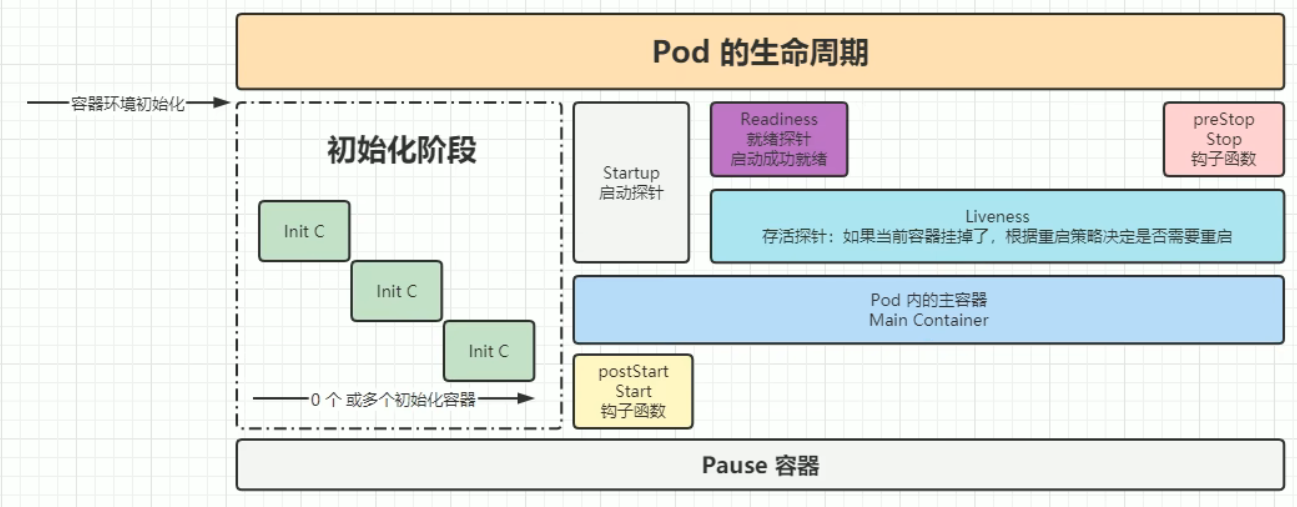
Init C: 初始化容器,可以塞自己的东西postStart:容器启动时回调,一般不使用,功能与容器容器中的启动CMD冲突,且postStart与CMD同时执行preStop: 容器关闭前回调,可进行注销下线、数据清理、数据销毁等操作Pod删除规则Endpoint删除Pod的IP地址Pod状态变为Terminating- 执行
preStop回调
preStop/postStart
spec:
  terminationGracePeriodSeconds: 30   # 等待 preStop 的执行时间,超过时间就直接关闭 Pod
  containers:
  - image: soscscs/myapp:v1
    name: myapp
    lifecycle:
      postStart:                      # 不常用
        exec:
          command:
          - sh
          - -c
          - "echo hello"
      preStop:
        httpGet:
          path: /shutdown             # 请求的uri
          port: 8080                  # 端口
          host: api.yilingyi.com      # 主机域名,不加该字段将请求Pod本身
          scheme: HTTP                # http协议,默认值HTTP,支持HTTP、HTTPS
spec:
terminationGracePeriodSeconds: 30 # 等待 preStop 的执行时间,超过时间就直接关闭 Pod
containers:
- image: soscscs/myapp:v1
name: myapp
lifecycle:
postStart: # 不常用
exec:
command:
- sh
- -c
- "echo hello"
preStop:
httpGet:
path: /shutdown # 请求的uri
port: 8080 # 端口
host: api.yilingyi.com # 主机域名,不加该字段将请求Pod本身
scheme: HTTP # http协议,默认值HTTP,支持HTTP、HTTPS
intc
apiVersion: apps/v1
kind: Deployment

metadata:
  annotations:
    deployment.kubernetes.io/revision: "1"
  labels:
    app: nginx-deploy
  creationTimestamp: "2025-09-13T06:34:57Z"
  name: nginx-deploy
  namespace: default

spec:
  replicas: 1
  revisionHistoryLimit: 10
  selector:
    matchLabels:
      app: nginx-deploy
  progressDeadlineSeconds: 600
  strategy:
    type: RollingUpdate
    rollingUpdate:
      maxSurge: 25%
      maxUnavailable: 25%

  template:                                 # pod 定义模板
    metadata:
      labels:
        app: nginx-deploy
    spec:
      initContainers:                       # 在 containers 之前运行
      - image: alpine
        imagePullPolicy: IfNotPresent
        name: init
        command: ["sh", "-c", "echo init"]
      containers:
      - name: nginx
        image: nginx:1.7.9
        imagePullPolicy: IfNotPresent
      dnsPolicy: ClusterFirst
      restartPolicy: Always
      schedulerName: default-scheduler
      terminationGracePeriodSeconds: 30
apiVersion: apps/v1
kind: Deployment
metadata:
annotations:
deployment.kubernetes.io/revision: "1"
labels:
app: nginx-deploy
creationTimestamp: "2025-09-13T06:34:57Z"
name: nginx-deploy
namespace: default
spec:
replicas: 1
revisionHistoryLimit: 10
selector:
matchLabels:
app: nginx-deploy
progressDeadlineSeconds: 600
strategy:
type: RollingUpdate
rollingUpdate:
maxSurge: 25%
maxUnavailable: 25%
template: # pod 定义模板
metadata:
labels:
app: nginx-deploy
spec:
initContainers: # 在 containers 之前运行
- image: alpine
imagePullPolicy: IfNotPresent
name: init
command: ["sh", "-c", "echo init"]
containers:
- name: nginx
image: nginx:1.7.9
imagePullPolicy: IfNotPresent
dnsPolicy: ClusterFirst
restartPolicy: Always
schedulerName: default-scheduler
terminationGracePeriodSeconds: 30