
service
通信结构
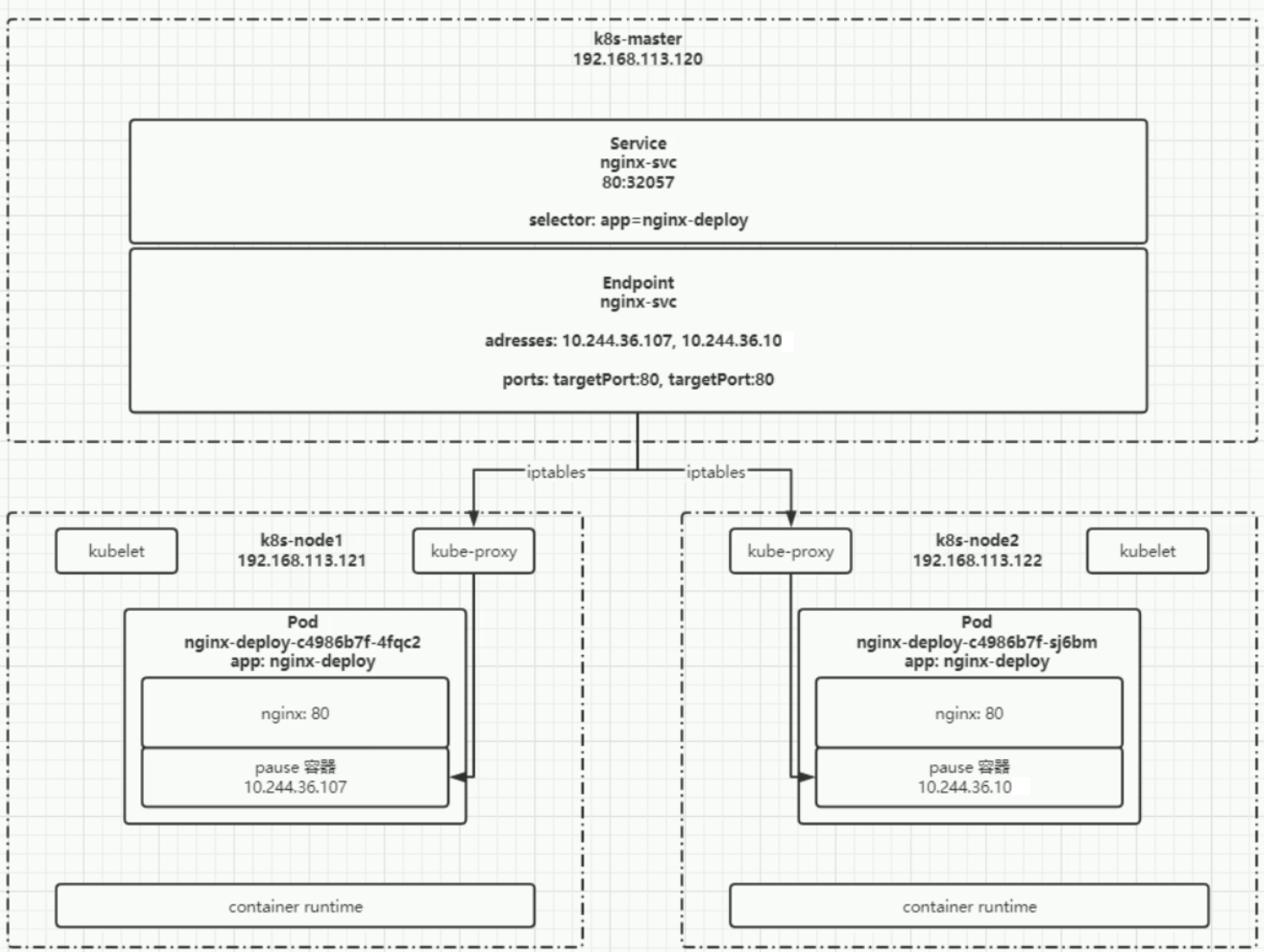
service 网络通信系统结构为
Pod: 所有容器运行在Pause容器之上,由Pause提供IP地址,应用容器定义需要暴露的PortNode: 通过kube-proxy为每个Pod的Pause容器分配k8s集群的IP地址EndPoint: 记录与之关联Service所管理的Pod的IP地址,以及Pod中应用容器暴露的Port,充当了Service所管理的Pod进行网络通信的「路由器」Service: 将目标Pod中需要暴露的Port与Node物理Port绑定,且管理EndPoint
通过 Service 便能构建一个通信网络,该网络中的 Pod 可互相通信; Service 也会反向代理所管理的 Pod
k8s集群内网访问:Pod中暴露的Port+Pause容器的IP- 集群内
Pod负载均衡: 通过Service的IP+Service的Port k8s集群外网访问:Service中绑定的物理Port+Node的物理IP,生产环境应当使用ingress代替
Note
一个 Service 内部应当只负责同一类 Pod 资源服务的网络通信,不同种类的 Pod 应当创建各自的 Service 对象
配置
apiVersion: v1
kind: Service

metadata:
  name: nginx-svc
  labels:
    app: nginx

spec:
  selector:                     # pod 选择器,不配置则不会创建 EndPoint
    app: nginx-deploy
  type: NodePort                # ClusterIP: 只能够在集群内部访问 service
                                # NodePort: 集群外部可通过 NodePort 访问 service
  ports:                        # 端口映射
  - name: web                   # 端口名
    port: 80                    # service 的端口
    targetPort: 80              # 需要与 service 端口绑定的 Pod 端口
    nodePort: 30007             # node 上的物理端口,默认会从 30000-32767 中随机选择一个值
apiVersion: v1
kind: Service
metadata:
name: nginx-svc
labels:
app: nginx
spec:
selector: # pod 选择器,不配置则不会创建 EndPoint
app: nginx-deploy
type: NodePort # ClusterIP: 只能够在集群内部访问 service
# NodePort: 集群外部可通过 NodePort 访问 service
ports: # 端口映射
- name: web # 端口名
port: 80 # service 的端口
targetPort: 80 # 需要与 service 端口绑定的 Pod 端口
nodePort: 30007 # node 上的物理端口,默认会从 30000-32767 中随机选择一个值
命令行
- 管理命令
Terminal
$kubeclt get svc
$kubeclt describe svc nginx-svc# 查看详情
$kubeclt get endpoints
$kubeclt get pods -o wide
- 内网请求
Terminal
$kubectl run -it --image busybox dns-test /bin/sh
$wget http://nginx-svc:80# 内网访问 Service
$wget http://nginx-svc.default:80# 访问其他命名空间的 service
外部代理
概念
外部代理:通过 Service 将外部服务伪装成内部 Pod 服务,内部 Pod 可直接通过代理 Service 访问外部服务。当外部服务变动时,只需修改代理 Service 即可。
IP 代理
-
创建无
endpont的serviceYAMLapiVersion: v1 kind: Service metadata: name: redis-proxy labels: app: redis-proxy spec: # 未配置 selector 不会自动创建 endpoint # selector: # app: nginx-deploy type: ClusterIP ports: # 端口映射 - name: redis # 端口名 port: 5678 # service 的端口 targetPort: 5678 # 需要与 service 端口绑定的 Pod 端口apiVersion: v1 kind: Service metadata: name: redis-proxy labels: app: redis-proxy spec: # 未配置 selector 不会自动创建 endpoint # selector: # app: nginx-deploy type: ClusterIP ports: # 端口映射 - name: redis # 端口名 port: 5678 # service 的端口 targetPort: 5678 # 需要与 service 端口绑定的 Pod 端口 -
创建
endpoint连接外部的redis服务YAMLapiVersion: v1 kind: EndPoints metadata: name: redis-proxy # 需要与 service 一致 labels: # 需要与 service 一致 app: redis-proxy subsets: - addresses: - ip: 10.2.3.10 # redis 的 IP 地址 ports: - name: web port: 5678 # redis 端口号 protocol: TCPapiVersion: v1 kind: EndPoints metadata: name: redis-proxy # 需要与 service 一致 labels: # 需要与 service 一致 app: redis-proxy subsets: - addresses: - ip: 10.2.3.10 # redis 的 IP 地址 ports: - name: web port: 5678 # redis 端口号 protocol: TCP
域名代理
apiVersion: v1
kind: Service

metadata:
name: bing-proxy
labels:
  app: bing-proxy

spec:
  type: ExternalName
  externalName: www.bing.cn         # 直接代理外部域名
apiVersion: v1
kind: Service
metadata:
name: bing-proxy
labels:
app: bing-proxy
spec:
type: ExternalName
externalName: www.bing.cn # 直接代理外部域名
ingress
通信结构
ingress
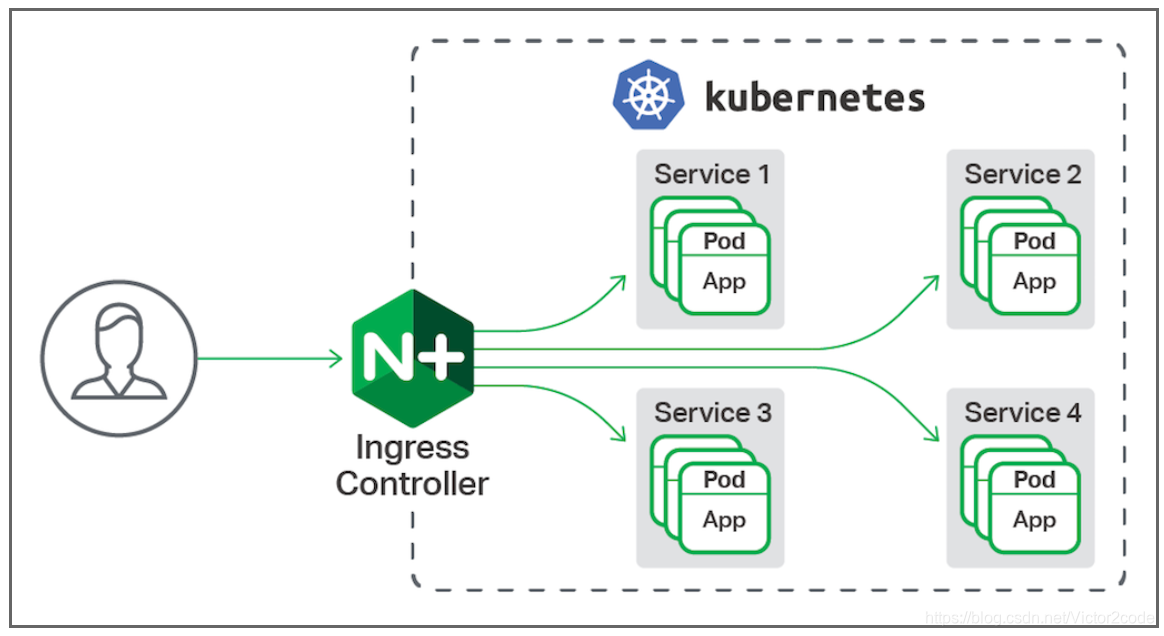
: 主要作用就是反向代理 service ,并且将 k8s 内部服务暴露给外部用户访问。但是,k8s又只制定了协议规则,需要自行安装控制器,例如 ingress-nginx
Note
ingress-nginx 的实现原理为在安装 ingress 的 Node 本地环境中安装了一个 nginx,然后通过 ingress 与本地的 nginx 进行通信,因此,集群外部可通过 Node 的物理 IP 直接访问反向代理的集群服务。
配置
apiVersion: networking.k8s.io/v1
kind: Ingress

metadata:
  name: minimal-ingress
  annotations:
    # 将 path 重写,然后再转发给 backend
    nginx.ingress.kubernetes.io/rewrite-target: /

spec:
  ingressClassName: nginx-example

  rules:
  - host: www.ingress.com               # 监听域名
    http:
      paths:                            # 路由配置
      - path: /testpath
        pathType: Prefix                # 匹配方式
        backend:
          service:                      # 目标 service
            name: test
            port:
              number: 80
apiVersion: networking.k8s.io/v1
kind: Ingress
metadata:
name: minimal-ingress
annotations:
# 将 path 重写,然后再转发给 backend
nginx.ingress.kubernetes.io/rewrite-target: /
spec:
ingressClassName: nginx-example
rules:
- host: www.ingress.com # 监听域名
http:
paths: # 路由配置
- path: /testpath
pathType: Prefix # 匹配方式
backend:
service: # 目标 service
name: test
port:
number: 80