
网络模式
桥接网络
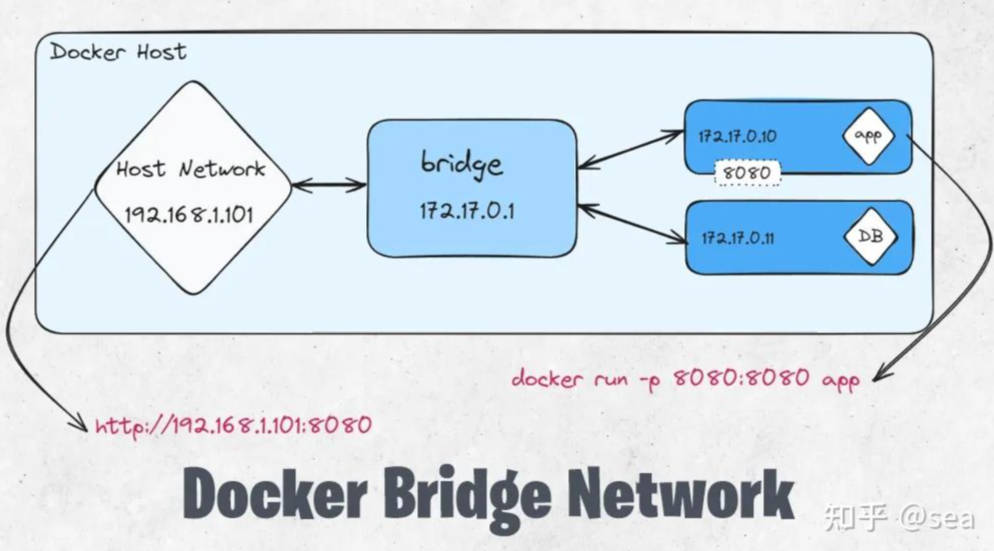
所有容器有各自的 ip 地址,然后把主机当路由器进行网络通信。
Terminal
$docker ps# 创建了两个容器
CONTAINER ID IMAGE COMMAND CREATED STATUS PORTS NAMES
0ff2b963d278 centos "/bin/bash" 9 minutes ago Up 9 minutes centos2
0ef15ae15a6d centos "/bin/bash" 59 minutes ago Up 9 minutes centos1
$docker network ls
NETWORK ID NAME DRIVER SCOPE
5dee61b2893f bridge bridge local # 默认桥接网络
7bb7cffe8f0c host host local
e157916b530f none null local
$docker network inspect 5dee61b2893f
...
"IPAM": {
"Driver": "default",
"Options": null,
"Config": [
{
"Subnet": "172.17.0.0/16", # 网关
"Gateway": "172.17.0.1" # 路由地址
}
]
},
...
"Containers": { # 容器网络
"0ef15ae15a6d170e262c6bdf7ef8dbd95844f2219d43129aec55a5a88332f437": {
"Name": "centos1",
"EndpointID": "bee4413f074f998aa88650e0b481b77ec245ca22e383c63604b472a46b95c302",
"MacAddress": "02:42:ac:11:00:02",
"IPv4Address": "172.17.0.2/16",
"IPv6Address": ""
},
"0ff2b963d2788834af0111d8becf4d6c50b85f5cac1298ec07b469f752dfedef": {
"Name": "centos2",
"EndpointID": "679a549ed90cdc840c85b343d8b4a87e5ea84741e0dac1233001f99303c96a36",
"MacAddress": "02:42:ac:11:00:03",
"IPv4Address": "172.17.0.3/16",
"IPv6Address": ""
}
},
...
$docker exec -it centos1 ping 172.17.0.3# 容器间通信
PING 172.17.0.3 (172.17.0.3) 56(84) bytes of data.
64 bytes from 172.17.0.3: icmp_seq=1 ttl=64 time=0.047 ms
...
$docker exec -it centos1 ping www.bilibili.com# 容器透过主机访问外网
PING a.w.bilicdn1.com (61.240.206.10) 56(84) bytes of data.
64 bytes from 61.240.206.10 (61.240.206.10): icmp_seq=1 ttl=63 time=29.8 ms
64 bytes from 61.240.206.10 (61.240.206.10): icmp_seq=2 ttl=63 time=29.8 ms
主机网络
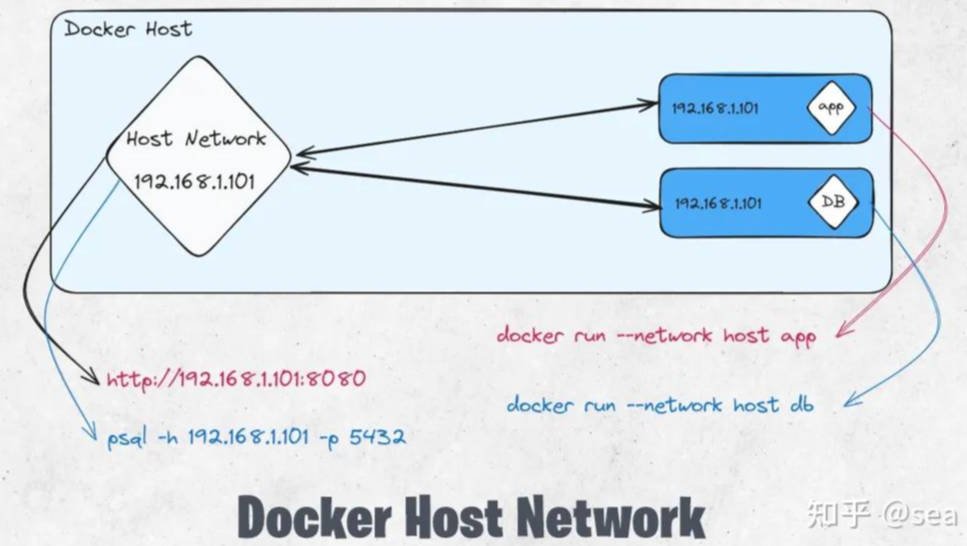
容器与主机有相同的网络设置,容器没有单独的 IP 地址。相反,它们使用的任何端口都直接链接到主机网络。例如,如果容器进程使用端口 8080,则可以通过 192.168.1.101:8080(即主机的 IP 地址和端口号)访问容器。
Terminal
$docker network ls
NETWORK ID NAME DRIVER SCOPE
5dee61b2893f bridge bridge local
7bb7cffe8f0c host host local # 默认主机网络
e157916b530f none null local
$docker run -dt --name centos1 --net host centos# 通过 net 将容器网络模式改为 host
5e761db124b4744d17edd984b384aee867f19b1c3a67f7a3257ffaf2f00f8654
$docker network inspect 7bb7cffe8f0c
...
"Containers": {
"5e761db124b4744d17edd984b384aee867f19b1c3a67f7a3257ffaf2f00f8654": {
"Name": "centos1",
"EndpointID": "f8c6d8889e90d62db2289bc228134cdd99dff435fd05012f21862f0469e6288f",
"MacAddress": "",
"IPv4Address": "",
"IPv6Address": ""
}
},
...
$ifconfig
eth0: flags=4163<UP,BROADCAST,RUNNING,MULTICAST> mtu 1500
inet 172.10.123.218 netmask 255.255.240.0 broadcast 172.18.175.255
...
$docker exec -it centos1 ping 172.10.123.218# 连通主机
PING 172.18.166.238 (172.18.166.238) 56(84) bytes of data.
64 bytes from 172.18.166.238: icmp_seq=1 ttl=64 time=1.44 ms
64 bytes from 172.18.166.238: icmp_seq=2 ttl=64 time=0.872 ms
...
容器互联
Note
link 互联容器网络方案不推荐,建议使用自定义网络替代
Terminal
$docker run -dt --link centos1 --name centos3 centos# 通过 link 打通容器网络
f94b1dd307fee5c178c6f98ab0e8ae25d7a59acac229bc7320d5eaf0eab9d729
$docker exec -it centos3 ping centos1
PING centos1 (172.17.0.2) 56(84) bytes of data.
64 bytes from centos1 (172.17.0.2): icmp_seq=1 ttl=64 time=0.093 ms
64 bytes from centos1 (172.17.0.2): icmp_seq=2 ttl=64 time=0.037 ms
64 bytes from centos1 (172.17.0.2): icmp_seq=3 ttl=64 time=0.039 ms
...
$docker inspect centos3
...
"Links": [
"/centos1:/centos3/centos1" # link 配置是单向的,只能 centos3 请求 centos1
],
...
$docker exec -it centos3 cat /etc/hosts
127.0.0.1 localhost
...
172.17.0.2 centos1 0ef15ae15a6d # link 本质就是在 host 中添加了 centos1 的 ip
172.17.0.4 f94b1dd307fe
...
自定义网络
Terminal
$docker network create --driver bridge --subnet 192.168.0.0/16 --gateway 192.168.0.1 MyNet
3989d944afb7c69d5632b40f365f345ac581ac6fefb25797dd24fe2505d02f30
$docker network ls
NETWORK ID NAME DRIVER SCOPE
3989d944afb7 MyNet bridge local
5dee61b2893f bridge bridge local
7bb7cffe8f0c host host local
e157916b530f none null local
$docker run -dt --name centos2 --net MyNet centos
107f424b261396ff4038f7f80728494e240dbf5a2f15db36192a4981263148cc
$docker run -dt --name centos3 --net MyNet centos
cf1aa04763baa209f0c39cd90700e877145a963d86669e8b529d035132bd7dae
$docker exec -it centos2 ping centos3# 同一自定义网络下的容器,能直接通过容器名通信
PING centos3 (192.168.0.3) 56(84) bytes of data.
64 bytes from centos3.MyNet (192.168.0.3): icmp_seq=1 ttl=64 time=0.050 ms
64 bytes from centos3.MyNet (192.168.0.3): icmp_seq=2 ttl=64 time=0.060 ms
...
网络连通
Note
实现容器跨网络,访问其他网络下的容器
Terminal
$docker run -dt --name centos4 --net bridge centos
628944e0489eb6b53885e4d8655ce1b662ab9eb4bdcb0b77685146961919e7c0
$docker network connect MyNet centos4# 将 bridge 下的容器连接到 MyNet 网络下
$docker network inspect MyNet
...
"Containers": {
"107f424b261396ff4038f7f80728494e240dbf5a2f15db36192a4981263148cc": {
"Name": "centos2",
"EndpointID": "3f56160aa1d18b21e97dbcd64c3100bf5ea4c617b697101b41a0add2bc3f0cb7",
"MacAddress": "02:42:c0:a8:00:02",
"IPv4Address": "192.168.0.2/16",
"IPv6Address": ""
},
"628944e0489eb6b53885e4d8655ce1b662ab9eb4bdcb0b77685146961919e7c0": {
"Name": "centos4", # 直接在 MyNet 网络下添加
"EndpointID": "ff308b69a2c2a2053e87fd0df851509c4588a06c92a756e412ca3f3708319440",
"MacAddress": "02:42:c0:a8:00:04",
"IPv4Address": "192.168.0.4/16",
"IPv6Address": ""
},
"cf1aa04763baa209f0c39cd90700e877145a963d86669e8b529d035132bd7dae": {
"Name": "centos3",
"EndpointID": "da023491ff991425a31cb2739b54d3b3d080adf24fe98d6c626a0151b4be496d",
"MacAddress": "02:42:c0:a8:00:03",
"IPv4Address": "192.168.0.3/16",
"IPv6Address": ""
}
},
...
$docker exec -it centos4 ip addr# 在 centos4 中创建了两个网络下的 IP
1: lo: <LOOPBACK,UP,LOWER_UP> mtu 65536 qdisc noqueue state UNKNOWN group default qlen 1000
link/loopback 00:00:00:00:00:00 brd 00:00:00:00:00:00
inet 127.0.0.1/8 scope host lo
valid_lft forever preferred_lft forever
16: eth0@if17: <BROADCAST,MULTICAST,UP,LOWER_UP> mtu 1500 qdisc noqueue state UP group default
link/ether 02:42:ac:11:00:02 brd ff:ff:ff:ff:ff:ff link-netnsid 0
inet 172.17.0.2/16 brd 172.17.255.255 scope global eth0
valid_lft forever preferred_lft forever
18: eth1@if19: <BROADCAST,MULTICAST,UP,LOWER_UP> mtu 1500 qdisc noqueue state UP group default
link/ether 02:42:c0:a8:00:04 brd ff:ff:ff:ff:ff:ff link-netnsid 0
inet 192.168.0.4/16 brd 192.168.255.255 scope global eth1
valid_lft forever preferred_lft forever