介绍
在 vscode 中,语言特性分为两类:
- 声明语言特性
Declarative language features: 属于文本编辑特性,vscode 已经提供了专门的 API 用于实现其功能- 语法高亮
- 括号匹配与自动补全
- 固定代码片段补全
- 代码缩进
- 注释快捷键
- 代码块折叠
- 程序语言特性
Programmatic language features: 需要自己编写额外模块,对项目代码进行动态分析,才能实现相关功能。vscode 只提供了相关的界面展示接口,具体展示内容依赖于代码分析结果- API 提示
- 自动补全
- 跳转到定义
- 语法检查
- 格式化
- 重命名
为了提供更强的语言分析能力,vscode 运行用户自定义 Language Server Protocol ,然后插件通过客户端的形式连接上语言服务。
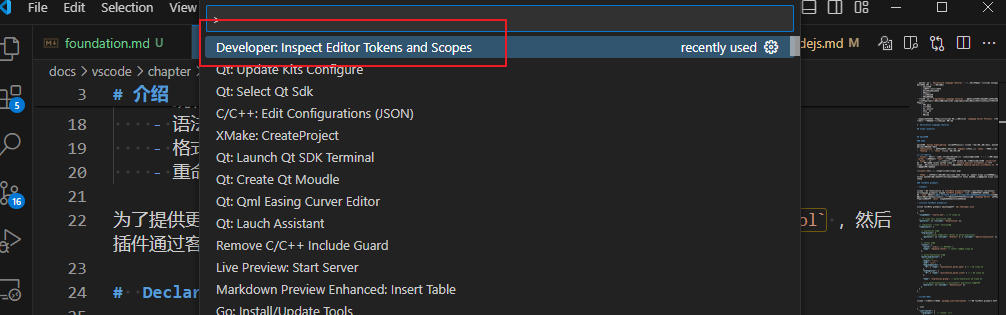
Scope inspector
vscode 自带的语法规则探测工具。
语法高亮
介绍
语法高亮 Syntax highlighting 确定了源码展示在 vscode 中的颜色和样式。关于语法高亮存在两个重要的概念:
Tokenization: 将源码划分为各个小节Segment,然后使用token标记这些小节Theming: 为token显示添加样式或颜色
基本概念:
Tocken: 可以是一个或多个字符,表示的是同一类语法元素,例如+ - /是操作符、varVal是变量名,"test"是字符串。Scope: 通过.进行命令,用于描述 Tocken 的一个数据结构,例如javascript中的+操作符号 Tocken 对应的 scope 是keyword.operator.arithmetic.js,且 Scope 也存在嵌套关系,source.js是最底层的,keyword.operator.arithmetic.js则是最靠近操作符的。
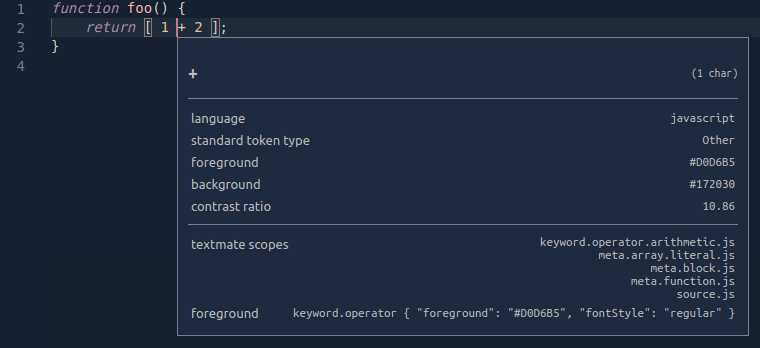
Theme: 描述文本颜色与样式。vscode 会将 Theme 添加到各个 Scope 上,这样就能使得 Tocken 具有文本样式的区分,即「语法高亮」,且 Token 会优先使用最靠近的 Scope 相关的 Theme
TextMate grammars
- 介绍
vscode 中的 Tokenization 由 TextMate grammars
解析。TextMate grammars 是由一系列正则表达构成的 .xml 或 .json 文件,因此 TextMate grammars 只能提供文本层面的源码解析能力,例如作用域、函数、字符串、注释等,而复杂的语法规则识别则只能依靠 Language Server 对源码进行分析,例如区分 const 修饰的变量名与普通变量名。
- 自定义 TextMate grammars
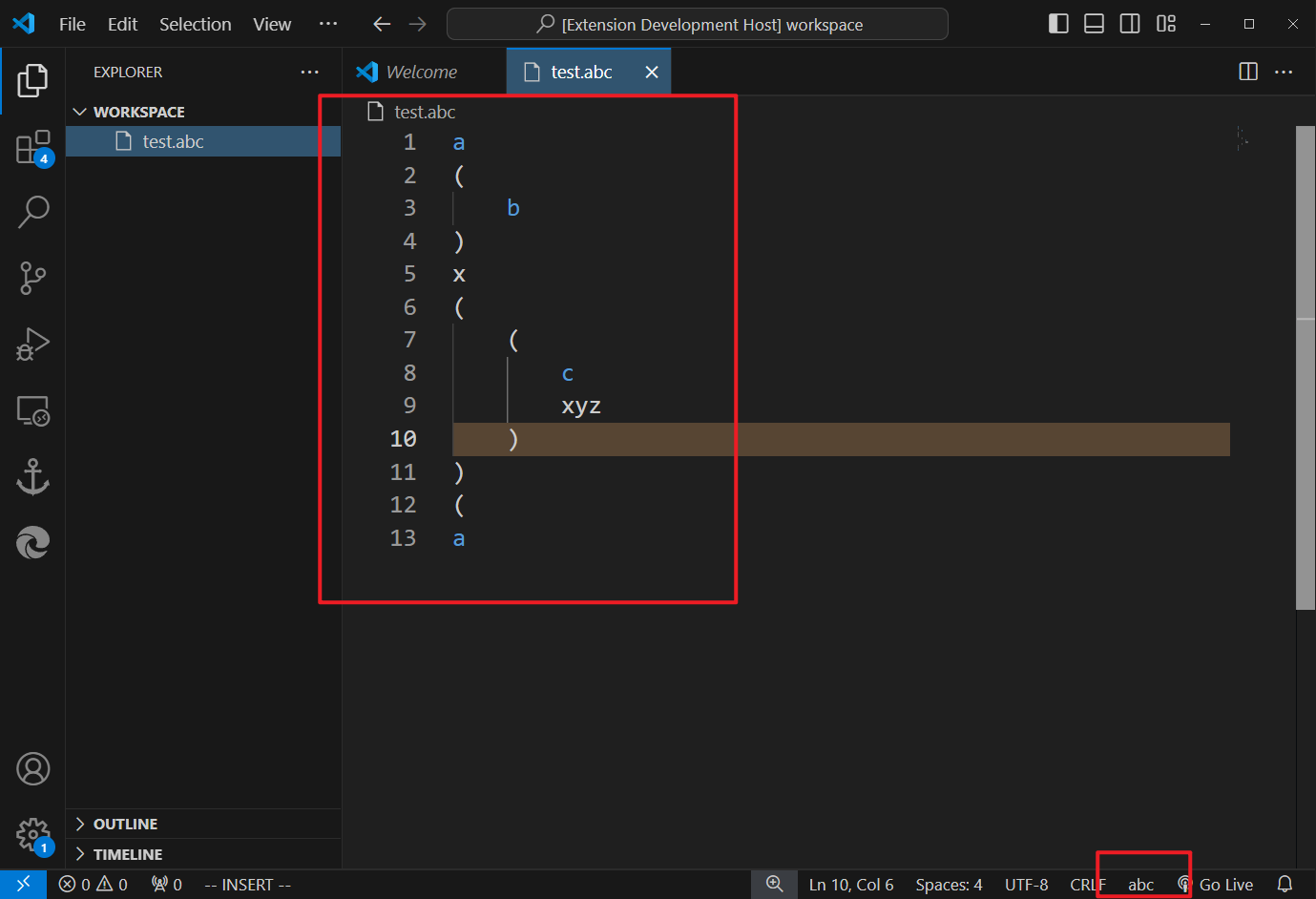
自定义 TextMate grammars 语法解析规则 abc.tmGrammar.json
{
  "scopeName": "source.abc", // 根 scope 名

  // 根 scope 包括 expression 元素
  "patterns": [{ "include": "#expression" }],

  // repository 中定义所有相关元素
  "repository": {

    // expression 元素
    "expression": {
       // expression 元素又包含 letter 与 paren-expression
      "patterns": [{ "include": "#letter" }, { "include": "#paren-expression" }]
    },

    // letter 元素
    "letter": {
      "match": "a|b|c", // 正则表达式
      "name": "keyword.letter" // letter 元素的 scope 名
    },

    // paren-expression 元素
    "paren-expression": {
      // 匹配 ()
      "begin": "\\(",
      "end": "\\)",
      "beginCaptures": {
        "0": { "name": "punctuation.paren.open" } // ( 的 scope 名
      },
      "endCaptures": {
        "0": { "name": "punctuation.paren.close" } // ) 的 scope 名
      },

      "name": "expression.group", // paren-expression 的 scope 名

      // 在 paren-expression 中又能嵌套包含 expression 元素内容
      "patterns": [{ "include": "#expression" }]
    }
  }
}- 插件配置
vscode 中,可以在插件的 package.json/contributes 中配置 TextMate grammars 规则
{
  "contributes": {
    "languages": [  // 定义语言类型
      {
        "id": "abc", // 语言标识符
        "extensions": [".abc"] // 语言源文件后缀
      }
    ],
    "grammars": [
      {
        "language": "abc", // 作用于哪类语言
        "scopeName": "source.abc", // 最顶层的 scope 名
        "path": "./syntaxes/abc.tmGrammar.json" // TextMate grammars
      }
    ]
  }
}
Embedded languages
通过 embeddedLanguages 还可以在定义的语法规则中,嵌套其他语言的语法规则。
{
  "contributes": {
       "languages": [
        {
          "id": "abc",
          "extensions": [".abc"]
        }
      ],
      "grammars": [
        {
          "language": "abc",
          "scopeName": "source.abc",
          "path": "./syntaxes/abc.tmGrammar.json",
          "embeddedLanguages": {
            // meta.embedded.block.javascript 这个 scope 对应的语言为 javascript
            "meta.embedded.block.javascript": "javascript"
          }
        }
      ]
  }
}在 abc.tmGrammar.json 中定义 meta.embedded.block.javascript
{
  "scopeName": "source.abc",
  "patterns": [{ "include": "#expression" }],
  "repository": {
    "expression": {
      "patterns": [{ "include": "#letter" }, { "include": "#paren-expression" },{ "include": "#javascript" }]
    },
    "letter": {
      "match": "a|b|c",
      "name": "keyword.letter"
    },
    "paren-expression": {
      "begin": "\\(",
      "end": "\\)",
      "beginCaptures": {
        "0": { "name": "punctuation.paren.open" }
      },
      "endCaptures": {
        "0": { "name": "punctuation.paren.close" }
      },
      "name": "expression.group",
      "patterns": [{ "include": "#expression" }]
    },

    // 由 <javascript> 与 <javascript/> 包裹的内容就是 meta.embedded.block.javascript
    "javascript":{
        "begin": "\\<javascript>",
        "end": "\\<javascript/>",
        "name": "meta.embedded.block.javascript",

        // NOTE - 将 javascript 的 TextMate Grammars 添加进来,就能实现语法高亮
        "patterns":[{"include": "source.js"}]
    }
  }
}
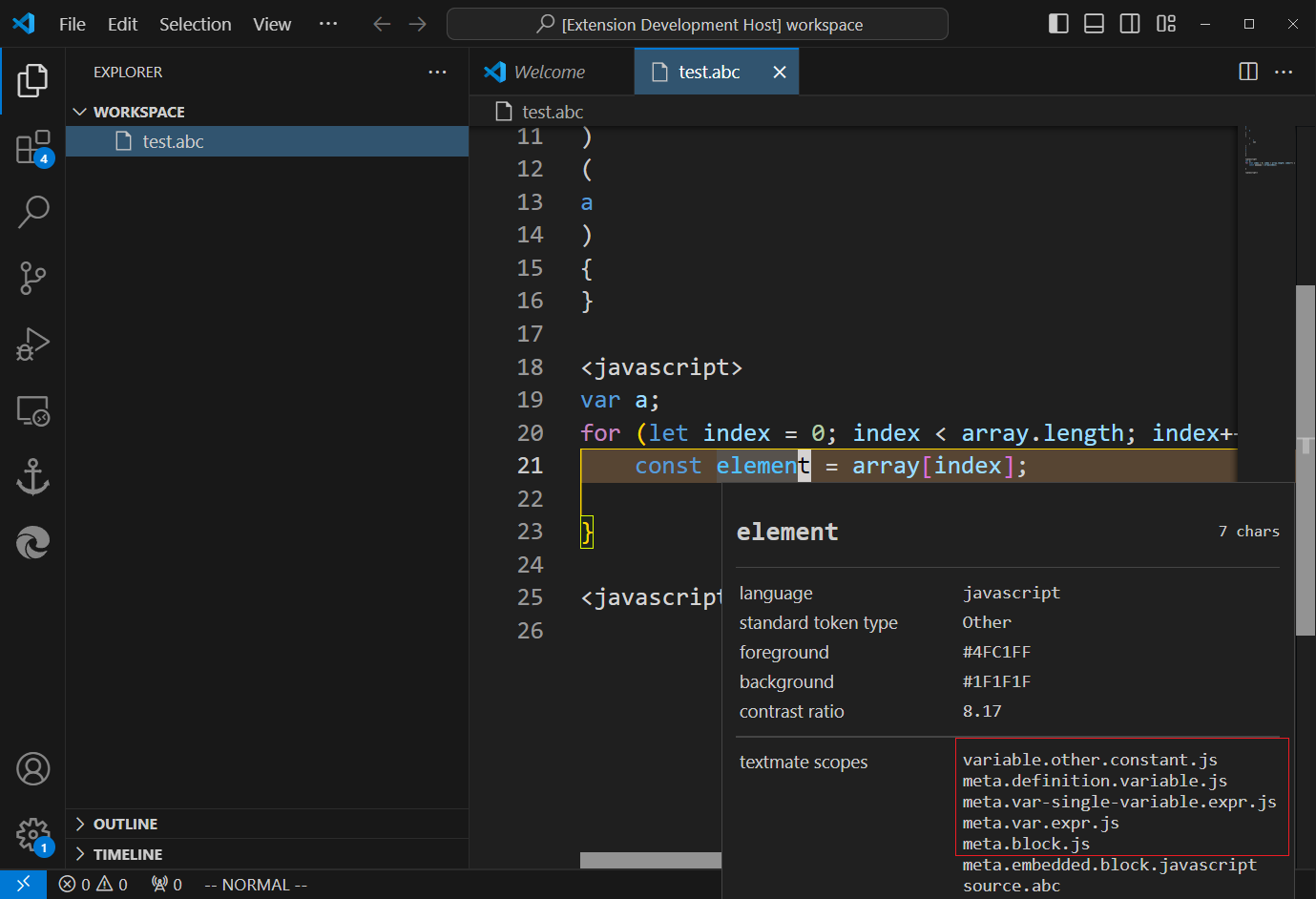
Note
embeddedLanguages 只能简单的使植入语言具有注释、片段提示、括号匹配的能力。自动补全等能力需要适配 Language Server
Injection
{
  "contributes": {
    "grammars": [
      {
        "path": "./syntaxes/code.codeblock.json",
        "scopeName": "markdown.codeblock.code",
        "injectTo": [
          "source.code" // 需要注入的 scope 规则
        ],
        "embeddedLanguages":{
            // 嵌入语言基本特性,scope 在 code.codeblock.json 中进行定义
            "meta.embedded.block.code": "code"
        }
      }
    ]
  }
}markdown 代码块样式注入:
{
	"fileTypes": [],
	"injectionSelector": "L:text.html.markdown",
	"patterns": [
		{
      // 修改 _code 为目标语言
			"include": "#fenced_code_block_code"
		}
	],
	"repository": {
    // 修改 _code 为目标语言
		"fenced_code_block_code": {
      // code1|code2|... : 在 markdown 中代码块的标识,多个可以用 `|` 分隔
			"begin": "(^|\\G)(\\s*)(`{3,}|~{3,})\\s*(?i:(code1|code2|...)((\\s+|:|\\{)[^`~]*)?$)",
			"name": "markup.fenced_code.block.markdown",
			"end": "(^|\\G)(\\2|\\s{0,3})(\\3)\\s*$",
			"beginCaptures": {
				"3": {
					"name": "punctuation.definition.markdown"
				},
				"4": {
					"name": "fenced_code.block.language.markdown"
				},
				"5": {
					"name": "fenced_code.block.language.attributes.markdown"
				}
			},
			"endCaptures": {
				"3": {
					"name": "punctuation.definition.markdown"
				}
			},
			"patterns": [
				{
					"begin": "(^|\\G)(\\s*)(.*)",
					"while": "(^|\\G)(?!\\s*([`~]{3,})\\s*$)",

          // 修改 code 为目标语言
					"contentName": "meta.embedded.block.code",
					"patterns": [
						{
							"include": "source.qml"
						}
					]
				}
			]
		}
	},

  // 修改 code 为目标语言
	"scopeName": "markdown.codeblock.code"
}语义高亮
介绍
语法高亮 Syntax highlight 只实现了文本层面的样式区分,并未实现语言特定语义的样式区分,为了弥补这个缺陷,vscode 提供了「语义高亮 Semantic Highlight」的机制。
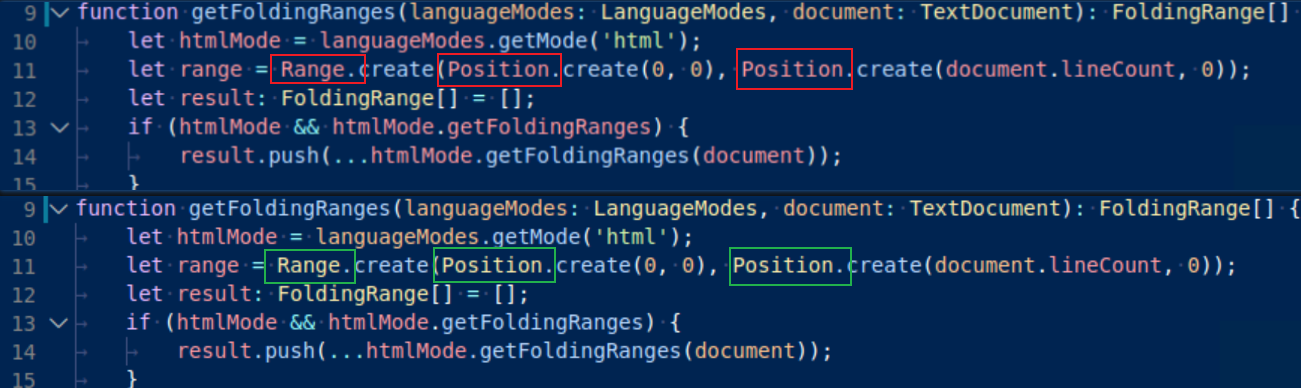
语义高亮基于 language servers 对源码分析得到的语法树,区分出了 Range、Position 并非是变量,而是一个类型,进而通过不同的 Token 进行标记。
Token
Token 存储的数据结构为一个整型数组,且 5 个整型表示一个 Token,第 i 号 token 存储结构为:
| 索引 | 含义 | 描述 |
|---|---|---|
5*i |
deltaLine |
相对行号,当前 Token 行号减去上一个 Token 行号 |
5*i + 1 |
deltaStart |
相对起始字符位置 |
5*i + 2 |
length |
长度 |
5*i + 3 |
tokenType |
类型, 即 SemanticTokensLegend.tokenTypes |
5*i + 4 |
tokenModifiers |
设置位,即 SemanticTokensLegend.tokenModifiers |
- deltaStart
if deltaLine == 0:
    当前 Token 起始字符减去上一个 Token 起始字符
else :
当前 Token 起始字符- tokenType
Token 的类型定义类似枚举,一个整数表示一个一个类型
const tokenTypes = [
        'class',    // tokenType = 0
        'interface', // tokenType = 1
        'enum', // tokenType = 2
        'function', // tokenType = 3
        'variable'] // tokenType = 4
- tokenModifiers
tokenModifiers 则采用标记位的形式进行存储
const tokenModifiers = [
            'declaration', // 0xb00000001
            'documentation']; // 0xb00000010
Note
案例:
# 原始的 token
tokenObj1 = { line: 2, startChar:  5, length: 3, tokenType: "property",  tokenModifiers: ["private", "static"] }
tokenObj2 = { line: 2, startChar: 10, length: 4, tokenType: "type",      tokenModifiers: [] }
tokenObj3 = { line: 5, startChar:  2, length: 7, tokenType: "class",     tokenModifiers: [] }

# 按照上述规则计算 Token 值
tokenObj1 = { deltaLine: 2, deltaStartChar: 5, length: 3, tokenType: 0, tokenModifiers: 3 },
tokenObj2 = { deltaLine: 0, deltaStartChar: 5, length: 4, tokenType: 1, tokenModifiers: 0 },
tokenObj3 = { deltaLine: 3, deltaStartChar: 2, length: 7, tokenType: 2, tokenModifiers: 0 }

# 储存为数组
   #       tokenObj1,  tokenObj2,  tokenObj3
Token = [ 2,5,3,0,3, 0,5,4,1,0, 3,2,7,2,0 ]Provider
// 定义 Token 标签
const tokenTypes = ['class', 'interface', 'enum', 'function', 'variable'];
const tokenModifiers = ['declaration', 'documentation'];
const legend = new vscode.SemanticTokensLegend(tokenTypes, tokenModifiers);

const provider: vscode.DocumentSemanticTokensProvider = {

    // 提供当前文档所有的 Token,重新生成 Token 数组
    provideDocumentSemanticTokens(
        document: vscode.TextDocument
    ): vscode.ProviderResult<vscode.SemanticTokens> {

        // 靠 Language Servers 解析出 Token
        // on line 1, characters 1-5 are a class declaration
        // token.linePos = new vscode.Position(1,1);
        // token.startPos = new vscode.Position(1,5);
        // token.type = "class";
        // token.modifiers = ["declaration"];
        let tokens = []

        // Semantic token 构造器,进行 Token 编码操作
        const tokensBuilder = new vscode.SemanticTokensBuilder(legend);
        for(let token of tokens){
            tokensBuilder.push(
                new vscode.Range(token.linePos, token.startPos),
                token.type,
                token.modifiers
            );
        }
        return tokensBuilder.build();
    }

    // 提供当前文档所有的 Token,在原有的 Token 数组上追加
    provideDocumentSemanticTokensEdits?
};

//  定义  Semantic token provider 作用范围
const selector = { language: 'java', scheme: 'file' };

// 向 vscode 中注册一个 Semantic token provider
// vscode 会自动调用,获取 Semantic Token
vscode.languages.registerDocumentSemanticTokensProvider(selector, provider, legend);主题
介绍
vscode 中主题样式为两类:
Workbench color: vscode 界面的主题样式设置,theme color referenceSyntax colors and styles: 编辑器中源码的主题样式。可以对TextMate themes与semantic tokens进行设置
两类主题都能在 settings.json 配置文件中进行自定义
{
    "workbench.colorCustomizations": {
        "titleBar.activeBackground": "#ff0000"
    },
    "editor.tokenColorCustomizations": {
        "comments": "#FF0000", // TextMate themes
        "[Material Theme]": { // semantic tokens
            "semanticHighlighting": true
        }
    }
}插件
- 插件配置
在 package.json/contributes 下的 themes 中可以配置主题样式
{
    "contributes": {
        "themes": [
            {
                "label": "test",
                "uiTheme": "vs-dark", // Workbench 基本主题
                "path": "./themes/test-color-theme.json" // 主题配置文件
            }
        ]
    }
}- test-color-theme.json
{
	"name": "test",

    // Workbench color 定义
	"colors": {
		"editor.background": "#263238",
		"editor.foreground": "#eeffff",
		"activityBarBadge.background": "#007acc",
		"sideBarTitle.foreground": "#bbbbbb"
	},

    // Syntax colors and styles 定义
	"tokenColors": [
		{
			"name": "Comment",
			"scope": [ // TextMate 或 semantic 的 scope 名称
				"comment",
				"punctuation.definition.comment"
			],
			"settings": { // 样式设置
				"fontStyle": "italic",
				"foreground": "#546E7A"
			}
		},
		{
			"name": "test",
			"scope":[
				"meta.embedded.block.javascript"
			],
			"settings": {
				"fontStyle": "italic",
				"foreground": "#e06c1e"
			}
		}
	]
}
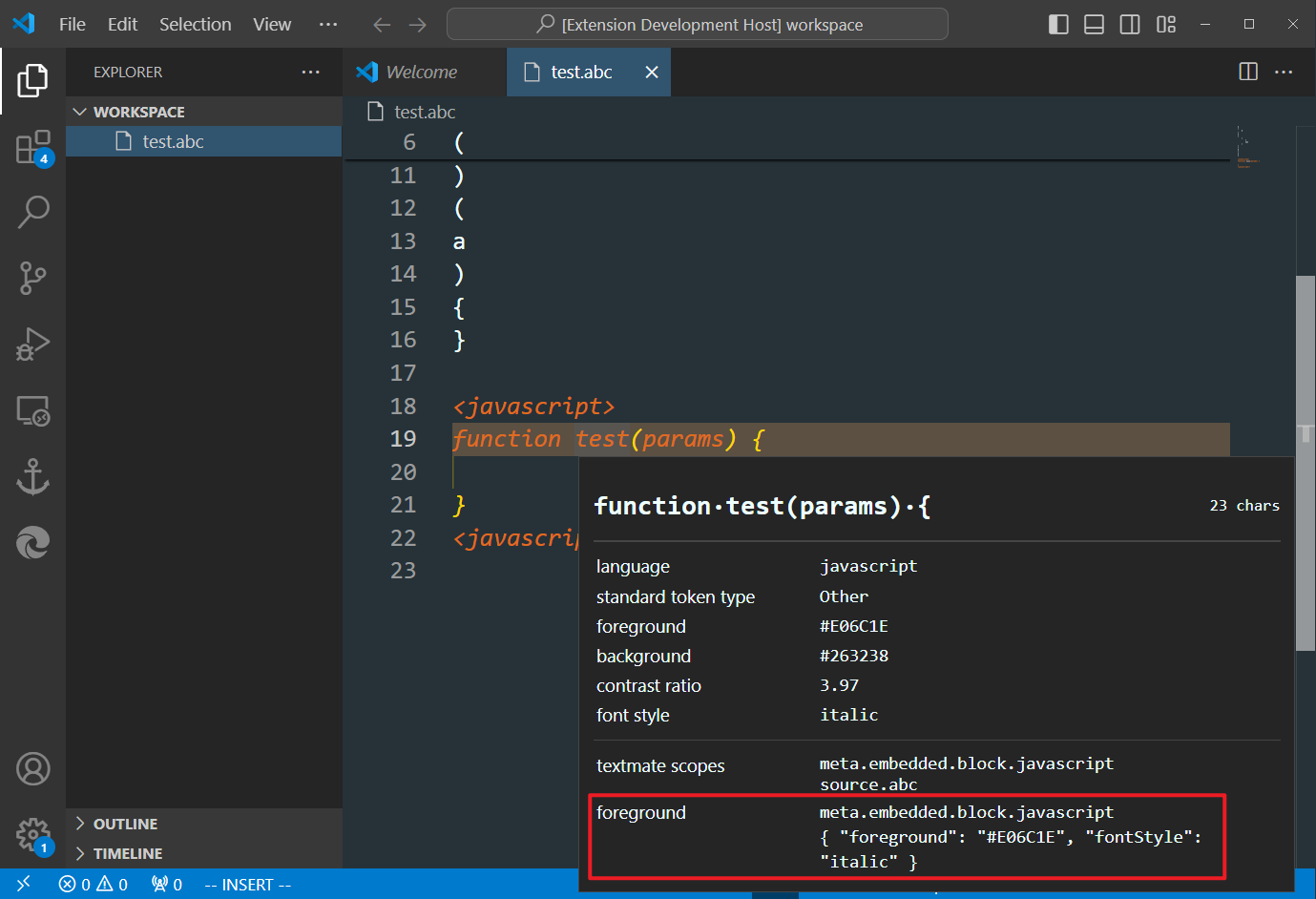
Snippet
在插件的 package.json/contributes 还能配置可以快捷输入的代码块,其配置规则见 Snippets in Visual Studio Code
{
  "contributes": {
    "snippets": [
      {
        "language": "javascript",
        "path": "./snippets.json"
      }
    ]
  }
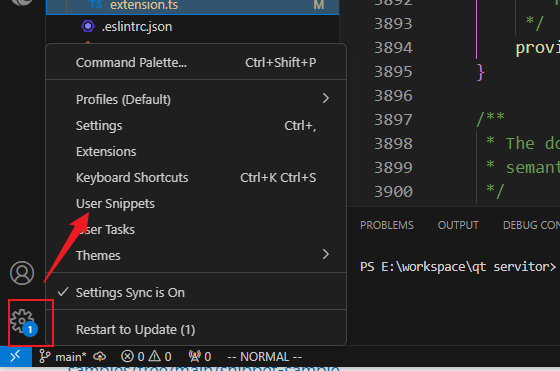
}Snippet 也可以在 vscode 中进行自定义
语言配置
{
    "contributes": {
        "languages": [
            {
            "id": "javascript",
            "extensions": [
                ".js"
            ],
            "aliases": [
                "js",
                "JavaScript"
            ],
            "configuration": "./language-configuration.json"
            }
        ]
    }
}vscode 的 package.json/contributes 可以 Declarative language features 的其他特性进行配置。language-configuration.json 配置细节见 Language Configuration Guide