
概念
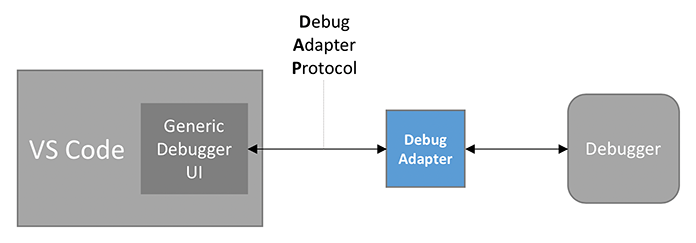
vscode 启动程序调试是通过 Debug Adapter Protocol
实现。然而不同语言都拥有自己的 Debugger,且这些调试器的实现规则也各不相同,不可能都遵循 Debug Adapter Protocol,因此, vscode 需要 Debugger 按照 Debug Adapter Protocol 创建一个能与之交互的 Debug Adapter。在 vscode 中添加调试器,其实是开发调试器的适配器,按照协议开发开发的调试器能直接配置到vscode 中进行使用。
配置文件
在 package.json/contributes 下可以对调试适配器进行配置
{
    "breakpoints": [ // 指定能调试哪个语言
        {
            "language": "markdown"
        }
    ],
    "debuggers": [
        {
            "type": "mock", // 调试器类型
            "languages": ["markdown"],
            "label": "Mock Debug",
            "program": "./out/debugAdapter.js", // 适配器入口

            // 调试适配器的运行环境
            "runtime": "node", // 全局设置
            "windows": { "program": "./bin/gdbDebug.exe" },  // windows 环境
            "osx": { "program": "./bin/gdbDebug.sh"}, // macos 环境
            "linux": { "program": "./bin/gdbDebug.sh"}, // linux 环境

            // 配置 Launch.json 文件
            "configurationAttributes": {
                "launch": { // 启动调试模式
                    "required": [
                        "program"
                    ],
                    "properties": {
                        "program": {
                            "type": "string",
                            "description": "Absolute path to a text file.",
                            "default": "${workspaceFolder}/${command:AskForProgramName}"
                        },
                        /* 。。其他参数 。。 */
                    }
                },
                "attach": { // 附加调试模式
                    "required": [
                        "program"
                    ],
                    "properties": {
                        "program": {
                            "type": "string",
                            "description": "Absolute path to a text file.",
                            "default": "${workspaceFolder}/${command:AskForProgramName}"
                        }
                    }
                    /* ...... */
                }
            },

            /* Launch.json 初始配置 */
            "initialConfigurations": [
                {
                    "type": "mock",
                    "request": "launch",
                    "name": "Ask for file name",
                    "program": "${workspaceFolder}/${command:AskForProgramName}"
                }
            ],

            /* Lanuch.json 中的提示描述 */
            "configurationSnippets": [
                {
                    "label": "Mock Debug: Launch",
                    "description": "A new configuration for 'debugging' a user selected markdown file.",
                    "body": {
                        "type": "mock",
                        "request": "launch",
                        "name": "Ask for file name",
                        "program": "^\"\\${workspaceFolder}/\\${command:AskForProgramName}\""
                    }
                }
            ],

            /* 实现 variables 与 commands 的绑定
               在 launch.json 文件中,在 debug 启动时,能直接通过 ${command:AskForProgramName} 触发命令 extension.mock-debug.getProgramName 获取结果*/
            "variables": {
                "AskForProgramName": "extension.mock-debug.getProgramName"
            }
        }
    ]
}vscode.commands.registerCommand('extension.mock-debug.getProgramName', config => {
return vscode.window.showInputBox({
placeHolder: 'Please enter the name of a markdown file in the workspace folder',
value: 'readme.md'
});
});除了能在 package.json 文件中能定义 launch.json 配置文件,还能通过 DebugConfigurationProvider)
动态提供配置。
适配器启动
vscode 启动
在 package.json/contributes/debuggers 中指定适配器启动入口后,便可在 vscode 的 Debugger 界面直接启动调试适配器。这样便可以将调试器与插件当作两个独立项目进行开发,但是这样开发调试就有点麻烦。插件和调试适配器的启动方式不同,因此还需要额外配置调试适配器的 launch.json 调试会话。
- launch.json
{
	"version": "0.2.0",
	"configurations": [

		{
            // 启动被调试插件
			"name": "Run Extension",
			"type": "extensionHost",
			"request": "launch",
			"args": [
				"--extensionDevelopmentPath=${workspaceFolder}"
			],
			"outFiles": [
				"${workspaceFolder}/out/**/*.js"
			],
			"preLaunchTask": "${defaultBuildTask}"
		},
		{
			// 启动一个 DA 调试服务,调试器会话可以连接该服务连接调试器
			"name": "DA Server",
			"type": "node",
			"request": "launch",
			"cwd": "${workspaceFolder}",
            // 调试适配器入口
			"program": "${workspaceFolder}/src/debugger/debugAdapter.ts",
			"args": [
                // 指定调试服务端口
				"--server=4711"
			],
			"outFiles": [
				"${workspaceFolder}/out/**/*.js"
			],
		},
	]
}- debugAdapter.ts
// 调试器
const debugger:  CustomDebugger;

/**
 * process.argv
 *   - 0, node 路径;
 *   - 1,被执行的 js 路径
 *   - 2 ... 在 `args` 中,用户输入的参数
 */
const args = process.argv.slice(2);

/* 解析服务端口号 */
let port = 0;
args.forEach(function (val, index, array) {
	const portMatch = /^--server=(\d{4,5})$/.exec(val);
	if (portMatch) {
		port = parseInt(portMatch[1], 10);
	}
});

if (port > 0) {
    /* NOTE - 该方案只用于调试适配器开发使用 */
	Net.createServer((socket) => {
		console.error('>> accepted connection from client');
		socket.on('end', () => {
			console.error('>> client connection closed\n');
		});

        // MockDebugSession 是调试适配器实现
		const session = new MockDebugSession(debugger);
		session.setRunAsServer(true);

        // 指定 vscode 与 DA 如何通信
		session.start(socket, socket);
	}).listen(port);
} else {
	const session = new MockDebugSession(debugger);
	process.on('SIGTERM', () => {
		session.shutdown();
	});
	session.start(process.stdin, process.stdout);
}- 插件连接
/* launch.json */
{
	"version": "0.2.0",
	"configurations": [
        {
            "type": "mock",
            "request": "launch",
            // ...
            "debugServer": 4711 // 指定需要连接的调试服务
        }
    ]
}插件启动
开发者想要对 Debug Adapter 和 Extension 进行调试,需要启动两个调试会话,这个对于开发者来说很不方便。若 Debug Adapter 和 Extension 都放到一个调试会话中,就需要通过 TypeScript/JavaScript 实现 Debug Adapter,然后通过 Extension 去启动 Debug Adapter,而非 vscode。当一个调试会话被激活,vscode 会调用 DebugAdapterDescriptorFactory.createDebugAdapterDescriptor 获取一个 Debug Adapter 用于调试。而 Debug Adapter 对象的提供方式有三种:
DebugAdapterExecutable: 适配器以可执行程序形式提供,并且利用stdout、stdin进行通信。vscode 默认方案DebugAdapterServer: 适配器以服务的形式提供DebugAdapterInlineImplementation: 适配器实现自vscode.DebugAdapter
class DebugAdapterExecutableFactory implements vscode.DebugAdapterDescriptorFactory {

	// The following use of a DebugAdapter factory shows how to control what debug adapter executable is used.
	// Since the code implements the default behavior, it is absolutely not neccessary and we show it here only for educational purpose.
	createDebugAdapterDescriptor(_session: vscode.DebugSession, executable: vscode.DebugAdapterExecutable | undefined): ProviderResult<vscode.DebugAdapterDescriptor> {
		// param "executable" contains the executable optionally specified in the package.json (if any)

		// use the executable specified in the package.json if it exists or determine it based on some other information (e.g. the session)
		if (!executable) {
			const command = "absolute path to my DA executable";
			const args = [
				"some args",
				"another arg"
			];
			const options = {
				cwd: "working directory for executable",
				env: { "envVariable": "some value" }
			};
			executable = new vscode.DebugAdapterExecutable(command, args, options);
		}

		// make VS Code launch the DA executable
		return executable;
	}
}

class InlineDebugAdapterFactory implements vscode.DebugAdapterDescriptorFactory {
    createDebugAdapterDescriptor(_session: vscode.DebugSession): ProviderResult<vscode.DebugAdapterDescriptor> {
        // 内部实现细节见 https://github.com/microsoft/vscode-mock-debug.git
		return new vscode.DebugAdapterInlineImplementation(new MockDebugSession(workspaceFileAccessor));
	}
}


export function activate(context: vscode.ExtensionContext) {

	let factory = null;

    /* 调试适配器和插件一起调试 */
    factory = new InlineDebugAdapterFactory();

    /* 调试器与插件分开运行 */
    factory = new DebugAdapterExecutableFactory();

	if ('dispose' in factory) {
		context.subscriptions.push(factory);
	}

    // 注册调试适配器
	context.subscriptions.push(vscode.debug.registerDebugAdapterDescriptorFactory('mock', factory));

}Debug Adapter Protocol
协议详情见 Debug Adapter Protocol
。一般而言我们也是直接使用 TypeScript/JavaScript 实现适配器,因此直接使用 vscode/debugprotocol 库,然后自定义实现 LoggingDebugSession 即可,实现细节见 mockDebug.ts
。