
概念
定义: 在程序运行时,序列化与反序列化就是为了将对象属性值进行保存或者加载。
- 序列化 (Serialization):将对象转化成字节序列的过程。
- 反序列化 (Deserialization):将字节序列转化成对象的过程。
作用:
- 持久化:将程序运行中的对象信息保存到本地,等需要的时候又能从本地进行对象数据恢复。
- 网络传输:网络直接传输数据,但是无法直接传输对象。这样就可以想把对的序列化保存到本地,然后将本地序列化数据传输出去。
- 数据结构转化:对于数据结构相近的两个结构体,就可以通过序列化与反序列化实现两个结构体对象的数据拷贝赋值,就不用去写拷贝构造与拷贝赋值了。
cereal
Tip
只是单纯 Json 序列化与反序列化,推荐 nlohmann
介绍
cereal 是一个开源的(BSD License)、轻量级的、支持C11特性的、仅仅包含头文件实现的、跨平台的C序列化库。它可以将任意的数据类型序列化成不同的表现形式,比如二进制、XML格式或JSON。
- 库文件:全部为
.hpp文件 - 环境:
c++11
结构体定义
对于需要序列化与反序列化的结构体需要实现 void serialize(Archive &archive) 模板函数,并且要在 archive 指定需要进行序列化的数据。
// 二进制序列
#include "cereal/archives/binary.hpp"

// NOTE - 当使用非基础类型,都需要指定一下
#include "cereal/types/string.hpp"

#include <string>

struct Tag
{
    std::string TagName;
    int id;

    template <class Archive>
    void serialize(Archive &archive)
    {
        archive(TagConfidence, id);
    }
};而对于自定义嵌套结构体,也都需要给出序列化操作
#include <list>
#include <string>

#include "cereal/archives/binary.hpp"

// 使用到的特殊类型
#include "cereal/types/string.hpp"
#include "cereal/types/list.hpp"

struct Tag
{
    std::string TagName;
    int id;

    // 子结构体的序列化
    template <class Archive>
    void serialize(Archive &archive)
    {
        archive(TagConfidence, id);
    }
};

struct TagGroup
{
    std::string TagGroupName;
    int id;

    // NOTE - 自定义的子结构体 Tag 也必须实现 void serialize(Archive &archive)
    std::list<Tag> Tags;

    template <class Archive>
    void serialize(Archive &archive)
    {
        // NOTE - 数据的传递顺序与 archive 的定义顺序一样
        archive(TagGroupName, id, Tags);
    }
};Note
cereal 支持几乎所有的标准库类型,但是不支持「原始指针对象」与「引用对象」。原始指针不能用,但是智能指针是可以。
序列化类型
- 二进制:序列化将数据放入了
ss流中,反序列化则从ss流中将数据读取出来CPP// 二进制 #include "cereal/archives/binary.hpp" #include <iostream> #include <sstream> int main(int argc, char const *argv[]) { // 流 std::stringstream ss; // 序列化数据 int a = 10; { // 创建序列化对象 cereal::BinaryOutputArchive archive(ss); // 序列化数据 archive(a); } // 反序列化 int b; { // 创建反序列化对象 cereal::BinaryInputArchive archive(ss); // 反序列化数据 archive(b); } std::cout << "a : " << a << "\n"; std::cout << "b : " << b << "\n"; return 0; }// 二进制 #include "cereal/archives/binary.hpp" #include <iostream> #include <sstream> int main(int argc, char const *argv[]) { // 流 std::stringstream ss; // 序列化数据 int a = 10; { // 创建序列化对象 cereal::BinaryOutputArchive archive(ss); // 序列化数据 archive(a); } // 反序列化 int b; { // 创建反序列化对象 cereal::BinaryInputArchive archive(ss); // 反序列化数据 archive(b); } std::cout << "a : " << a << "\n"; std::cout << "b : " << b << "\n"; return 0; }Terminaltriangle@LEARN:~$ ./a.exea : 10b : 10 - xml:序列化是将数据保存到
test.xml文件中,而反序列化则是从test.xml中读取数据CPP#include "cereal/archives/xml.hpp" #include "cereal/types/string.hpp" #include <iostream> #include <fstream> int main(int argc, char const *argv[]) { { // 文件输出流 std::ofstream os("test.xml"); // 序列化数据 int oa = 10; std::string ostr = "fuck"; // 创建序列化对象 cereal::XMLOutputArchive oarchive(os); // 序列化数据 // cereal::make_nvp 可以用来指定 xml 中数据的标签名称 oarchive & cereal::make_nvp("int", oa); oarchive & cereal::make_nvp("str", ostr); } { // 文件输入流 std::ifstream is("test.xml"); // 序列化数据 int ia = 0; std::string istr = ""; // 创建反序列化对象 cereal::XMLInputArchive iarchive(is); // 反序列化数据 iarchive(ia, istr); std::cout << "ia : " << ia << "\n"; std::cout << "istr : " << istr << "\n"; } return 0; }#include "cereal/archives/xml.hpp" #include "cereal/types/string.hpp" #include <iostream> #include <fstream> int main(int argc, char const *argv[]) { { // 文件输出流 std::ofstream os("test.xml"); // 序列化数据 int oa = 10; std::string ostr = "fuck"; // 创建序列化对象 cereal::XMLOutputArchive oarchive(os); // 序列化数据 // cereal::make_nvp 可以用来指定 xml 中数据的标签名称 oarchive & cereal::make_nvp("int", oa); oarchive & cereal::make_nvp("str", ostr); } { // 文件输入流 std::ifstream is("test.xml"); // 序列化数据 int ia = 0; std::string istr = ""; // 创建反序列化对象 cereal::XMLInputArchive iarchive(is); // 反序列化数据 iarchive(ia, istr); std::cout << "ia : " << ia << "\n"; std::cout << "istr : " << istr << "\n"; } return 0; } - json:与 xml 类似,序列化是将数据保存到
test.json文件中,而反序列化则是从test.json中读取数据CPP#include "cereal/archives/json.hpp" #include "cereal/types/string.hpp" #include <iostream> #include <fstream> int main(int argc, char const *argv[]) { { // 输出流 std::ofstream os("test.json"); // 序列化数据 int oa = 10; std::string ostr = "fuck"; // 创建序列化对象 cereal::JSONOutputArchive oarchive(os); // 序列化数据 // cereal::make_nvp 可以用来指定 json 中数据的属性名称 oarchive & cereal::make_nvp("int", oa); oarchive & cereal::make_nvp("str", ostr); } { // 输入流 std::ifstream is("test.json"); // 序列化数据 int ia = 0; std::string istr = ""; // 创建反序列化对象 cereal::JSONInputArchive iarchive(is); // 反序列化数据 iarchive(ia, istr); std::cout << "ia : " << ia << "\n"; std::cout << "istr : " << istr << "\n"; } return 0; }#include "cereal/archives/json.hpp" #include "cereal/types/string.hpp" #include <iostream> #include <fstream> int main(int argc, char const *argv[]) { { // 输出流 std::ofstream os("test.json"); // 序列化数据 int oa = 10; std::string ostr = "fuck"; // 创建序列化对象 cereal::JSONOutputArchive oarchive(os); // 序列化数据 // cereal::make_nvp 可以用来指定 json 中数据的属性名称 oarchive & cereal::make_nvp("int", oa); oarchive & cereal::make_nvp("str", ostr); } { // 输入流 std::ifstream is("test.json"); // 序列化数据 int ia = 0; std::string istr = ""; // 创建反序列化对象 cereal::JSONInputArchive iarchive(is); // 反序列化数据 iarchive(ia, istr); std::cout << "ia : " << ia << "\n"; std::cout << "istr : " << istr << "\n"; } return 0; }
RAII 模式
cereal::JSONOutputArchive 与 cereal::XMLOutputArchive 均采用 RAII 模式进行设计,这就导致只有 RAII 对象调用构造函数时,才会真正的保存数据文件。
#include "cereal/archives/json.hpp"
#include "cereal/types/string.hpp"

#include <iostream>
#include <fstream>

int main(int argc, char const *argv[])
{

    // {
        // 输出流
        std::ofstream os("test.json");

        // 序列化数据
        int oa = 10;
        std::string ostr = "fuck";

        // 创建序列化对象
        cereal::JSONOutputArchive oarchive(os);

        // 序列化数据
        oarchive & cereal::make_nvp("int", oa);
        oarchive & cereal::make_nvp("str", ostr);
    // }

    // {
        // 输入流
        std::ifstream is("test.json");

        // 序列化数据
        int ia = 0;
        std::string istr = "";

        // 创建反序列化对象
        cereal::JSONInputArchive iarchive(is);

        // 反序列化数据
        iarchive(ia, istr);

        std::cout << "ia : " << ia << "\n";
        std::cout << "istr : " << istr << "\n";
    // }

    return 0;
}当一次运行上述程序时,就会抛出异常。因为序列化执行完毕后,oarchive 并没有马上被释放,那么 test.json 也根本没有生成。这就导致反序列化操作读取 test.json 失败(因为根本就没这个文件)。
序列化本质
#include "cereal/archives/binary.hpp"
#include "cereal/types/string.hpp"
#include <sstream>

struct TestA
{
    int a1;
    int a2;
    std::string str;

    template <class Archive>
    void serialize(Archive &archive)
    {
        archive(a1,a2,str);
    }
};

struct TestB
{
    int b1;
    int b2;
    std::string str;

    template <class Archive>
    void serialize(Archive &archive)
    {
        archive(b1,b2,str);
    }
};对两个结构相似的结构体进行序列化与反序列化
int main(int argc, char const *argv[])
{
    // 输出流
    std::stringstream ss;

    {
        TestA test;
        test.a1 = 10;
        test.a2 = 20;
        test.str = "fuck";

        // 创建序列化对象
        cereal::BinaryOutputArchive oarchive(ss);

        oarchive(test);
    }

    {
        TestB test;

        // 创建序列化对象
        cereal::BinaryInputArchive oarchive(ss);

        oarchive(test);

        std::cout << "b1 " << test.b1 << "\n";
        std::cout << "b2 " << test.b2 << "\n";
        std::cout << "str " << test.str << "\n";
    }

    return 0;
}结果为
修改结构体TestB中序列化函数中变量顺序
struct TestB
{
    int b1;
    int b2;
    std::string str;

    template <class Archive>
    void serialize(Archive &archive)
    {
        // archive(b1,b2,str);
        archive(b2);
        archive(b1);
        archive(str);
    }
};Note
TestB 接收 TestA 数据的顺序发生了变化,这是因为 TestB 中 serialize 定义的变量序列化顺序发生了改变。 序列化与反序列化的本质就是根据用户在 serialize 中定义的变量顺序进行单纯的 memorycpy 。
序列化函数
-
serialize函数:可以用于序列化与返序列化CPP// ================ 结构体内部 ====================== struct MyClass { int x, y, z; template<class Archive> void serialize(Archive & archive) { archive( x, y, z ); } }; // ================ 结构体外部 ====================== struct MyClass { int x, y, z; }; template<class Archive> void serialize(Archive & archive, MyClass & m) { archive( m.x, m.y, m.z ); }// ================ 结构体内部 ====================== struct MyClass { int x, y, z; template<class Archive> void serialize(Archive & archive) { archive( x, y, z ); } }; // ================ 结构体外部 ====================== struct MyClass { int x, y, z; }; template<class Archive> void serialize(Archive & archive, MyClass & m) { archive( m.x, m.y, m.z ); } -
save/load函数:save 负责序列化;load 负责反序列化CPP// ================ 结构体内部 ====================== struct MyClass { int x, y, z; // NOTE - const 函数 template<class Archive> void save(Archive & archive) const { archive( x, y, z ); } template<class Archive> void load(Archive & archive) { archive( x, y, z ); } }; // ================ 结构体外部 ====================== struct MyClass { int x, y, z; }; // NOTE - 参数类型必须是 const 的 template<class Archive> void save(Archive & archive, const MyClass & m) { archive( m.x, m.y, m.z ); } template<class Archive> void load(Archive & archive, MyClass & m) { archive( m.x, m.y, m.z ); }// ================ 结构体内部 ====================== struct MyClass { int x, y, z; // NOTE - const 函数 template<class Archive> void save(Archive & archive) const { archive( x, y, z ); } template<class Archive> void load(Archive & archive) { archive( x, y, z ); } }; // ================ 结构体外部 ====================== struct MyClass { int x, y, z; }; // NOTE - 参数类型必须是 const 的 template<class Archive> void save(Archive & archive, const MyClass & m) { archive( m.x, m.y, m.z ); } template<class Archive> void load(Archive & archive, MyClass & m) { archive( m.x, m.y, m.z ); } -
最小化序列函数
CPPstruct MyData { double d; template <class Archive> double save_minimal(Archive const & ) const { return d; } template <class Archive> void load_minimal( Archive const &, double const & value ) { d = value; } };struct MyData { double d; template <class Archive> double save_minimal(Archive const & ) const { return d; } template <class Archive> void load_minimal( Archive const &, double const & value ) { d = value; } }; -
定义私有的序列化函数
CPP// 添加头文件 #include <cereal/access.hpp> class MyCoolClass { private: int secretX; // 给访问权限 friend class cereal::access; template <class Archive> void serialize( Archive & ar ) { ar( secretX ); } };// 添加头文件 #include <cereal/access.hpp> class MyCoolClass { private: int secretX; // 给访问权限 friend class cereal::access; template <class Archive> void serialize( Archive & ar ) { ar( secretX ); } }; -
版本控制
CPPstruct Tag { std::string TagName; std::string TagDescript; }; // 注册版本号 CEREAL_CLASS_VERSION(Tag, CUR_VERSION); // 在序列化函数中获取版本号 template<class Archive> void serialize(Archive &ar, Tag& cls, const unsigned int version) { ar & make_nvp("TagName", cls.TagName); // 新版本添加的字段 if (version >= 0x22) { ar & make_nvp("TagDescript", cls.TagDescript); } }struct Tag { std::string TagName; std::string TagDescript; }; // 注册版本号 CEREAL_CLASS_VERSION(Tag, CUR_VERSION); // 在序列化函数中获取版本号 template<class Archive> void serialize(Archive &ar, Tag& cls, const unsigned int version) { ar & make_nvp("TagName", cls.TagName); // 新版本添加的字段 if (version >= 0x22) { ar & make_nvp("TagDescript", cls.TagDescript); } }
流
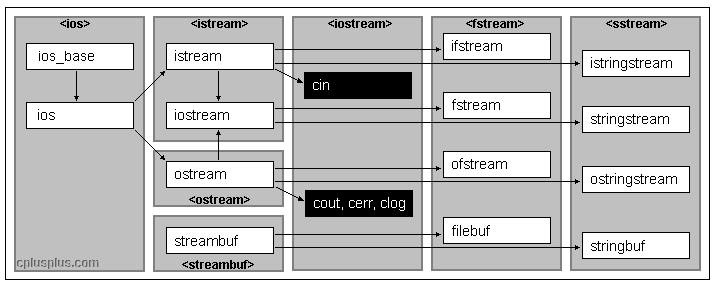
- 设备
- istream:常用于接收从键盘输入的数据,例如
std::cin; - ostream:常用于将数据输出到屏幕上,例如
std::cout; - iostream:继承自 istream 和 ostream 类,因为该类的功能兼两者于一身,既能用于输入,也能用于输出;
- istream:常用于接收从键盘输入的数据,例如
- 文件
- ifstream:用于读取文件中的数据;
- ofstream:用于向文件中写入数据;
- fstream:兼 ifstream 和 ofstream 类功能于一身,既能读取文件中的数据,又能向文件中写入数据。
- 类型转换
- istringstream:输入
- ostringstream:输出
- stringstream:两者
Qt 序列化
- 定义:
#include <QDataStream>
#include <QString>
#include <QList>
#include <QMap>
#include <QVector>
#include <QDebug>

/* ========================== 结构体内部 ========================= */
struct TestA
{
    QList<int> lst;
    QMap<int,QString> map;
    std::vector<int> vec;

    // 序列化
    friend QDataStream &operator<<(QDataStream &output , const TestA &dataInfo)
    {
        output << dataInfo.lst << dataInfo.map ;
        return output;
    }

    // 反序列化
    friend QDataStream &operator>>(QDataStream &input , TestA &dataInfo)
    {
        input >> dataInfo.lst >> dataInfo.map;
        return input;
    }
};

/* ========================== 结构体外部 ========================= */
struct TestB
{
    QList<int> lst;
    QMap<int,QString> map;
    std::vector<int> vec;
};

// 序列化
QDataStream &operator<<(QDataStream &output , const TestB &dataInfo)
{
    output << dataInfo.lst << dataInfo.map;
    return output;
}

// 反序列化
QDataStream &operator>>(QDataStream &input , TestB &dataInfo)
{
    input >> dataInfo.lst >> dataInfo.map;
    return input;
}Qt 中,序列化与反序列化是通过重写函数 QDataStream &operator<< 与 QDataStream &operator>> 实现。 Qt 序列化不支持标准库容器、标准字符串等类型。
- 使用:
int main(int argc, char const *argv[])
{
    TestA stA;
    stA.lst.push_back(1);
    stA.lst.push_back(2);
    stA.map.insert(1,"fuck");
    stA.map.insert(2,"you");

    QByteArray send_data;

    // 序列化
    QDataStream outd(&send_data,QIODevice::ReadWrite);
    outd << stA;

    TestB stB;
    // 反序列化
    QDataStream intd(&send_data,QIODevice::ReadWrite);
    intd >> stB;

    qDebug() << stA.map[1];
    qDebug() << stB.map[1];
    return 0;
}