
常用标签
展示类
文本
<div>
    <h1>一级标题</h1>
    <h2>二级标题</h2>
    <p>段落文本</p>
    <p><b>加粗</b> <i>斜体</i> <u>下划线</u> </p>
</div>
<div>
<h1>一级标题</h1>
<h2>二级标题</h2>
<p>段落文本</p>
<p><b>加粗</b> <i>斜体</i> <u>下划线</u> </p>
</div>
一级标题
二级标题
段落文本
加粗 斜体 下划线
无序列表
<ul>
    <li>列表</li>
    <li>列表</li>
</ul>
<ul>
<li>列表</li>
<li>列表</li>
</ul>
- 列表
- 列表
有序列表
<ol>
    <li>列表</li>
    <li>列表</li>
</ol>
<ol>
<li>列表</li>
<li>列表</li>
</ol>
- 列表
- 列表
表格
<table>
    <tr>
        <th>字段</th>
        <th>字段</th>
        <th>字段</th>
    </tr>
    <tr>
        <td>1</td>
        <td>1</td>
        <td>1</td>
    </tr>
    <tr>
        <td>2</td>
        <td>2</td>
        <td>2</td>
    </tr>
</table>
<table>
<tr>
<th>字段</th>
<th>字段</th>
<th>字段</th>
</tr>
<tr>
<td>1</td>
<td>1</td>
<td>1</td>
</tr>
<tr>
<td>2</td>
<td>2</td>
<td>2</td>
</tr>
</table>
| 字段 | 字段 | 字段 |
|---|---|---|
| 1 | 1 | 1 |
| 2 | 2 | 2 |
控件类
input
所有交互相关的控件基本上都能使用 input 实现
<input type="text" value="输入内容"> </br>
<input type="button" value="按钮"> </br>
<input type="checkbox" value=""> 复选框 </br>
<input type="color" value=""> </br>
<input type="date" value=""> </br>
<input type="file" value=""> </br>
    。。。
<input type="text" value="输入内容"> </br>
<input type="button" value="按钮"> </br>
<input type="checkbox" value=""> 复选框 </br>
<input type="color" value=""> </br>
<input type="date" value=""> </br>
<input type="file" value=""> </br>
。。。
复选框
按钮
<button>按钮</button><button>按钮</button>
下拉框
<select name="" id="">
    <option value="">选项1</option>
    <option value="">选项2</option>
    <option value="" selected="selected">选项3</option>
</select>
<select name="" id="">
<option value="">选项1</option>
<option value="">选项2</option>
<option value="" selected="selected">选项3</option>
</select>
表单
<!--
    action: url
    method: 请求方法
    onsubmit: 表单提交前触发事件
-->
<form action="#" method="post" onsubmit="return check()">
    <label for="">账号:</label>
    <input type="text" class="account" placeholder="输入账号"> </br>

    <label for="">密码:</label>
    <input type="password" class="pwd" placeholder="输入密码">

    <!-- submit 类型的输入便能提交按钮 -->
    <input type="submit" value="登陆">
</form>
<!--
action: url
method: 请求方法
onsubmit: 表单提交前触发事件
-->
<form action="#" method="post" onsubmit="return check()">
<label for="">账号:</label>
<input type="text" class="account" placeholder="输入账号"> </br>
<label for="">密码:</label>
<input type="password" class="pwd" placeholder="输入密码">
<!-- submit 类型的输入便能提交按钮 -->
<input type="submit" value="登陆">
</form>
viewport
视口viewport : 浏览器用来显示网页的区域
<!DOCTYPE html>
<html lang="zh">
  <head>
    <meta charset="UTF-8">
    <!--
        width=device-width : 按照设备实际宽度渲染网页
        initial-scale=1.0 : 初始化缩放为 1
        user-scalable=no : 不允许用户缩放
    -->
    <meta name="viewport" content="
                width=device-width,
                initial-scale=1.0,
                minimum-scale=1.0,
                maximum-scale=2.0,
                user-scalable=no
                ">
    <title>Vite App</title>
  </head>
  <body>
  </body>
</html>
<!DOCTYPE html>
<html lang="zh">
<head>
<meta charset="UTF-8">
<!--
width=device-width : 按照设备实际宽度渲染网页
initial-scale=1.0 : 初始化缩放为 1
user-scalable=no : 不允许用户缩放
-->
<meta name="viewport" content="
width=device-width,
initial-scale=1.0,
minimum-scale=1.0,
maximum-scale=2.0,
user-scalable=no
">
<title>Vite App</title>
</head>
<body>
</body>
</html>
iframe
简介
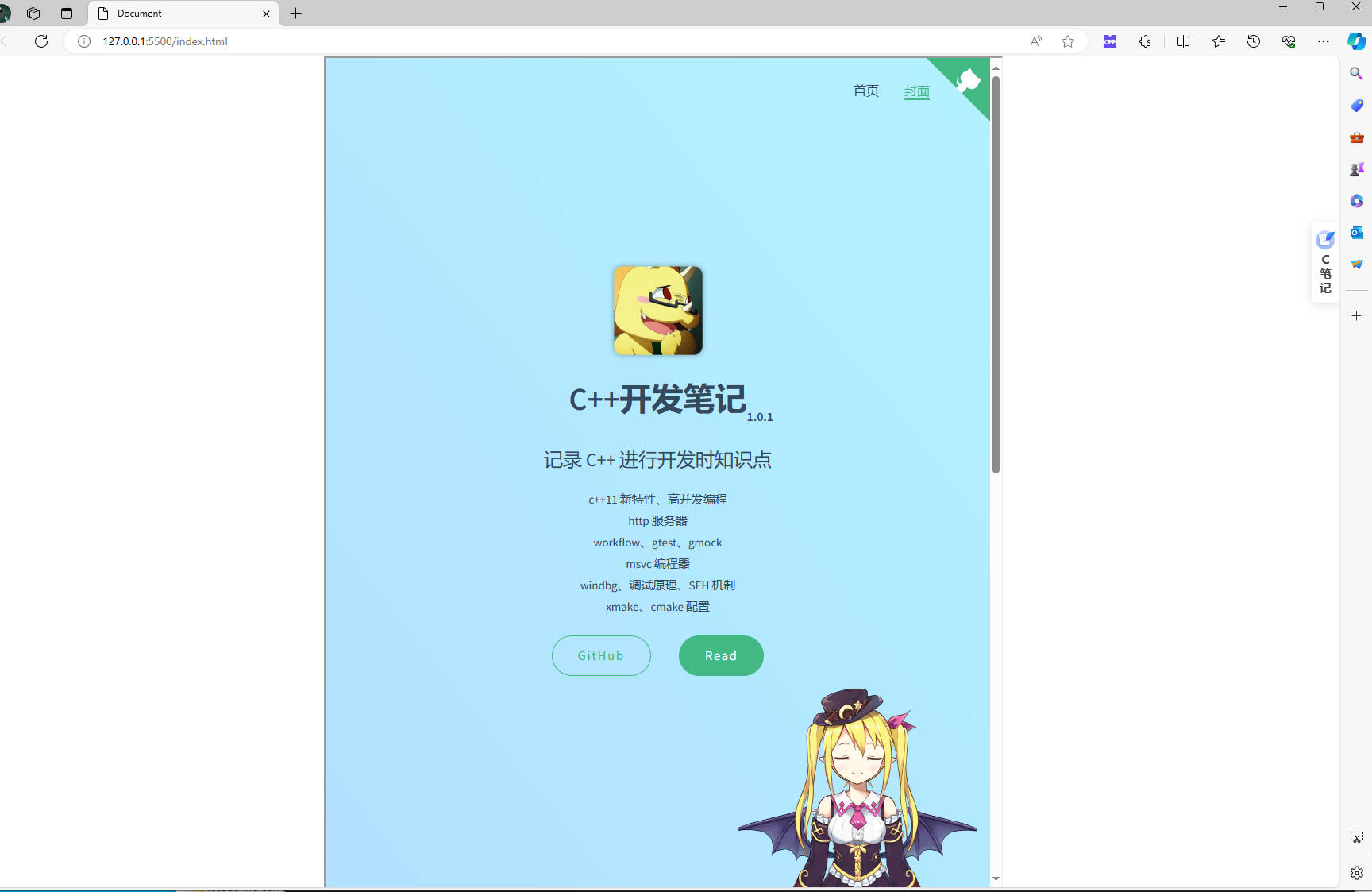
iframe 是 HTML 内联框架元素,它能够将另一个 HTML 页面嵌入到当前页面中。
<!DOCTYPE html>
<html lang="en">
<head>
    <meta charset="UTF-8">
    <meta name="viewport" content="width=device-width, initial-scale=1.0">
    <title>Document</title>
    <style>
        /* Make the html body cover the entire (visual) viewport with no scroll bars. */
        html, body { padding: 0; margin: 0; overflow:hidden; height: 200vh }
      </style>
</head>
<body>
    <div style="width: inherit; height: inherit; display: flex; justify-content: center;" >
        <iframe
            title="notebook"
            style="width: 50%;height: 50%;"
            src="https://spite-triangle.github.io/cpp_notes/#/"></iframe>
    </div>
</body>
</html>
<!DOCTYPE html>
<html lang="en">
<head>
<meta charset="UTF-8">
<meta name="viewport" content="width=device-width, initial-scale=1.0">
<title>Document</title>
<style>
/* Make the html body cover the entire (visual) viewport with no scroll bars. */
html, body { padding: 0; margin: 0; overflow:hidden; height: 200vh }
</style>
</head>
<body>
<div style="width: inherit; height: inherit; display: flex; justify-content: center;" >
<iframe
title="notebook"
style="width: 50%;height: 50%;"
src="https://spite-triangle.github.io/cpp_notes/#/"></iframe>
</div>
</body>
</html>
基本属性
Property:
    name                window.frames[name]时专用的属性
    scrolling           是否支持滚动
    src                 要展示的网页
    sandbox             限制
Property:
name window.frames[name]时专用的属性
scrolling 是否支持滚动
src 要展示的网页
sandbox 限制
信息访问
同域
同域: iframe 的 src 访问网页与主界面在同一服务器下,即请求 host 与通信协议一样。在同域的条件下,父界面能修改子界面内容,子界面也能修改父界面。
- 主界面访问子界面
    // 获取 iframe
    var iframe = document.getElementById("iframe1");
    // iframe 的 window 对象
    var iwindow = iframe.contentWindow;
    // iframe 的 document 对象
    var idoc = iwindow.document;

    // 若 iframe 设置 name 属性,直接获取
    window.frames['name'].window
    window.frames['name'].document
// 获取 iframe
var iframe = document.getElementById("iframe1");
// iframe 的 window 对象
var iwindow = iframe.contentWindow;
// iframe 的 document 对象
var idoc = iwindow.document;
// 若 iframe 设置 name 属性,直接获取
window.frames['name'].window
window.frames['name'].document
- 子界面访问主界面
    // 当前 iframe 的父级 window 对象
    window.parent

    // 最顶层的 window 对象,即最开始加载的界面
    window.top

    // 自身
    window.self
// 当前 iframe 的父级 window 对象
window.parent
// 最顶层的 window 对象,即最开始加载的界面
window.top
// 自身
window.self
跨域
父级与子级跨域不能直接访问彼此的属性,但可以使用 CDM(cross document messaging) 进行消息通信。
    /*  ====================父级脚本================== */
    // 接收子级返回的消息
    window.addEventListener('message',(e)=>{
        e.data;
    },false);

    let ifr = window.frames['sendMessage'];
    // 向子级的 host 发送信息
    ifr.postMessage('send a message', 'Targethost');

    /* ====================子级脚本=================== */
    // 接收父级消息
    window.addEventListener('message', (e)=>{
        // 发送信息的源 host
        e.origin;

        // origin 发送过来的消息
        e.data;

        // 发送消息文档的 window 对象代理
        e.source;

        // 向发送信息的 host 返回消息
        e.source.postMessage('received message', e.origin);
    }, false);
/* ====================父级脚本================== */
// 接收子级返回的消息
window.addEventListener('message',(e)=>{
e.data;
},false);
let ifr = window.frames['sendMessage'];
// 向子级的 host 发送信息
ifr.postMessage('send a message', 'Targethost');
/* ====================子级脚本=================== */
// 接收父级消息
window.addEventListener('message', (e)=>{
// 发送信息的源 host
e.origin;
// origin 发送过来的消息
e.data;
// 发送消息文档的 window 对象代理
e.source;
// 向发送信息的 host 返回消息
e.source.postMessage('received message', e.origin);
}, false);
Note
Targethost 的写法为 http://localhost 而非 http://localhost/,末尾不写 /
JS 库
- 导出
/* 一般用法 */
export var target; // 导出变量
export function fcn() { // 导出函数

}
/* 一般用法 */
export var target; // 导出变量
export function fcn() { // 导出函数
}
- NodeJs 导入
import { export_content } from "module";

const module = require("module");
import { export_content } from "module";
const module = require("module");
- 浏览器导入
<script type="text/javascript" src="module.js"></script> <script type="text/javascript" src="module.js"></script>
WebSocket
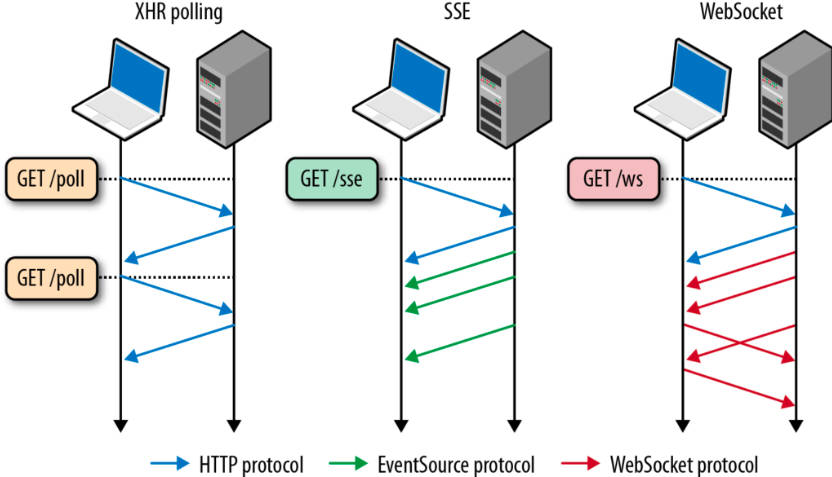
服务器与客户端的交互一般是客户端主动发起请求,服务返回响应的形式进行,但是这种交互模式不能实现服务端对客户端主动发送消息,例如服务器发生了某一事件,需要主动通知客户端发生了什么事件。
polling: 轮询,客户端间隔一段时间就发送一次请求,服务器检测到事件就会通知在响应中通知客户端。long-polling: 长轮询,客户端一直发送请求,无间隔时间WebSocket: 客户端与服务端直接建立一个类似socket的连接,支持相互收发信息。
    // NodeJs 获取
    const WebSocket = require("ws")
    // 浏览器获取
    const WebSocket = window.WebSocket;

    // 按照 ws、wss 协议进行通信,会自动对 http、https 协议进行封装
    var web = new WebSocket("ws://127.0.0.1:5500");

    web.onopen = ()=>{
        console.log("open");
    };

    web.onmessage = (ev)=>{
        console.log(ev.data);
    }

    web.onerror = (ev)=>{
        console.log(ev);
    };
// NodeJs 获取
const WebSocket = require("ws")
// 浏览器获取
const WebSocket = window.WebSocket;
// 按照 ws、wss 协议进行通信,会自动对 http、https 协议进行封装
var web = new WebSocket("ws://127.0.0.1:5500");
web.onopen = ()=>{
console.log("open");
};
web.onmessage = (ev)=>{
console.log(ev.data);
}
web.onerror = (ev)=>{
console.log(ev);
};