
简介
Mybatis
是一款优秀的ORM (Object Relation Mapping)框架,也称之为Mybatis3,便于 SQL 与实体类之间建立映射关系
Object:Java实体对象Relation: 关系型数据库Mapping: 映射
但 Mybatis 属于「半自动 ORM」需要手动编写 SQL,还有一些配置工作。其主要简化的工作在于:
- 统一数据库连接,不用关心底层实现,且封装了调用操作
- 自动实现数据表与实体类之间的映射关系(如字段名、主键等)
开发环境
- 使用
Spring Initializr创建项目,一定要选择< 4.0.10的版本 - 添加依赖
spring webMyBatis FrameworkSqlit JDBC Driver: 也可以换其他数据,如PostgreSQL、MySQL等。
pom.xml配置说明
	<dependencies>
        <!-- spring 框架 -->
		<dependency>
			<groupId>org.springframework.boot</groupId>
			<artifactId>spring-boot-starter-webmvc</artifactId>
		</dependency>

        <!-- spring 集成的 mybatis 依赖,会自动导入 mybatis 包 -->
		<dependency>
			<groupId>org.mybatis.spring.boot</groupId>
			<artifactId>mybatis-spring-boot-starter</artifactId>
			<version>4.0.1</version>
		</dependency>

        <!--  数据库底层驱动 -->
		<dependency>
			<groupId>org.xerial</groupId>
			<artifactId>sqlite-jdbc</artifactId>
			<scope>runtime</scope>
		</dependency>

        <!-- 测试框架相关 -->
		<dependency>
			<groupId>org.springframework.boot</groupId>
			<artifactId>spring-boot-starter-webmvc-test</artifactId>
			<scope>test</scope>
		</dependency>
		<dependency>
			<groupId>org.mybatis.spring.boot</groupId>
			<artifactId>mybatis-spring-boot-starter-test</artifactId>
			<version>4.0.1</version>
			<scope>test</scope>
		</dependency>

	</dependencies>

	<build>
		<plugins>
			<plugin>
				<groupId>org.springframework.boot</groupId>
				<artifactId>spring-boot-maven-plugin</artifactId>
			</plugin>
		</plugins>
	</build>
<dependencies>
<!-- spring 框架 -->
<dependency>
<groupId>org.springframework.boot</groupId>
<artifactId>spring-boot-starter-webmvc</artifactId>
</dependency>
<!-- spring 集成的 mybatis 依赖,会自动导入 mybatis 包 -->
<dependency>
<groupId>org.mybatis.spring.boot</groupId>
<artifactId>mybatis-spring-boot-starter</artifactId>
<version>4.0.1</version>
</dependency>
<!-- 数据库底层驱动 -->
<dependency>
<groupId>org.xerial</groupId>
<artifactId>sqlite-jdbc</artifactId>
<scope>runtime</scope>
</dependency>
<!-- 测试框架相关 -->
<dependency>
<groupId>org.springframework.boot</groupId>
<artifactId>spring-boot-starter-webmvc-test</artifactId>
<scope>test</scope>
</dependency>
<dependency>
<groupId>org.mybatis.spring.boot</groupId>
<artifactId>mybatis-spring-boot-starter-test</artifactId>
<version>4.0.1</version>
<scope>test</scope>
</dependency>
</dependencies>
<build>
<plugins>
<plugin>
<groupId>org.springframework.boot</groupId>
<artifactId>spring-boot-maven-plugin</artifactId>
</plugin>
</plugins>
</build>
使用
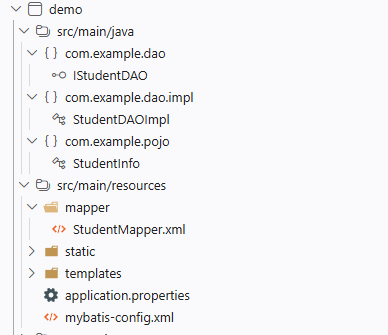
-
提前准备好数据库
database/test.dbSQLCREATE TABLE student (id INTEGER PRIMARY KEY AUTOINCREMENT, username TEXT NOT NULL, age INTEGER); INSERT INTO student (username, age) VALUES ('sam', 18); INSERT INTO student (username, age) VALUES ('zelda', 16); INSERT INTO student (username, age) VALUES ('link', 16);CREATE TABLE student (id INTEGER PRIMARY KEY AUTOINCREMENT, username TEXT NOT NULL, age INTEGER); INSERT INTO student (username, age) VALUES ('sam', 18); INSERT INTO student (username, age) VALUES ('zelda', 16); INSERT INTO student (username, age) VALUES ('link', 16);
```
-
在
src\main\resources下创建mybatis-config.xml配置文件XML<?xml version="1.0" encoding="UTF-8" ?> <!DOCTYPE configuration PUBLIC "-//mybatis.org//DTD Config 3.0//EN" "http://mybatis.org/dtd/mybatis-3-config.dtd"> <configuration> <environments default="development"> <environment id="development"> <!-- JDBC 为原生的数据库连接方式 --> <transactionManager type="JDBC"/> <!-- 数据库配置, UNPOOLED 表示不要连接池,POOLED 连接池 --> <dataSource type="UNPOOLED"> <!-- 数据库驱动 --> <property name="driver" value="org.sqlite.JDBC"/> <!-- 数据库文件将生成在项目根目录 --> <property name="url" value="jdbc:sqlite:database/test.db"/> <!-- sqlite 数据库默认没有密码,所以不需要配置。 <property name="username" value="${username}"/> <property name="password" value="${password}"/> --> </dataSource> </environment> </environments> <mappers> <!-- mapper 配置 --> </mappers> </configuration><?xml version="1.0" encoding="UTF-8" ?> <!DOCTYPE configuration PUBLIC "-//mybatis.org//DTD Config 3.0//EN" "http://mybatis.org/dtd/mybatis-3-config.dtd"> <configuration> <environments default="development"> <environment id="development"> <!-- JDBC 为原生的数据库连接方式 --> <transactionManager type="JDBC"/> <!-- 数据库配置, UNPOOLED 表示不要连接池,POOLED 连接池 --> <dataSource type="UNPOOLED"> <!-- 数据库驱动 --> <property name="driver" value="org.sqlite.JDBC"/> <!-- 数据库文件将生成在项目根目录 --> <property name="url" value="jdbc:sqlite:database/test.db"/> <!-- sqlite 数据库默认没有密码,所以不需要配置。 <property name="username" value="${username}"/> <property name="password" value="${password}"/> --> </dataSource> </environment> </environments> <mappers> <!-- mapper 配置 --> </mappers> </configuration> -
在
src\main\java下实现pojo实体类(不依赖框架、只有属性和getter/setter的纯粹Java类)JAVApackage com.example.pojo; /* pojo: 数据库字段的映射实体类,用于映射具体数据 - 属性名、属性类型与数据库表一致,方便映射 - 属性类型要使用 `Wrapper Class` 类型,能自动处理 `null` - 需要有默认构造和带参构造 */ package com.example.pojo; public class StudentInfo { private String username; private Integer age; private Integer id; public Integer getId() { return id; } public void setId(Integer id) { this.id = id; } public StudentInfo() { // 默认构造方法,没有参数,使用默认值 this.username = ""; this.age = 0; this.id = 0; } public StudentInfo(String username, Integer age, Integer id) { this.username = username; this.age = age; this.id = id; } public void print() { System.out.println("name: " + this.username); System.out.println("age: " + this.age); System.out.println("id: " + this.id); } public String getUsername() { return username; } public void setUsername(String name) { this.username = name; } public Integer getAge() { return age; } public void setAge(Integer age) { this.age = age; } }package com.example.pojo; /* pojo: 数据库字段的映射实体类,用于映射具体数据 - 属性名、属性类型与数据库表一致,方便映射 - 属性类型要使用 `Wrapper Class` 类型,能自动处理 `null` - 需要有默认构造和带参构造 */ package com.example.pojo; public class StudentInfo { private String username; private Integer age; private Integer id; public Integer getId() { return id; } public void setId(Integer id) { this.id = id; } public StudentInfo() { // 默认构造方法,没有参数,使用默认值 this.username = ""; this.age = 0; this.id = 0; } public StudentInfo(String username, Integer age, Integer id) { this.username = username; this.age = age; this.id = id; } public void print() { System.out.println("name: " + this.username); System.out.println("age: " + this.age); System.out.println("id: " + this.id); } public String getUsername() { return username; } public void setUsername(String name) { this.username = name; } public Integer getAge() { return age; } public void setAge(Integer age) { this.age = age; } } -
在
src\main\java下创建DAO (Data Access Object)接口,用于定义数据库操作方法JAVApackage com.example.dao; import java.util.List; import com.example.pojo.StudentInfo; public interface IStudentDAO { /** * 学生信息数据访问接口 */ public List<StudentInfo> findAll() throws Exception; }package com.example.dao; import java.util.List; import com.example.pojo.StudentInfo; public interface IStudentDAO { /** * 学生信息数据访问接口 */ public List<StudentInfo> findAll() throws Exception; } -
在
src\main\resources下创建mapper文件夹,并在其中创建StudentMapper.xml映射文件XML<?xml version="1.0" encoding="UTF-8"?> <!DOCTYPE mapper PUBLIC "-//mybatis.org//DTD Mapper 3.0//EN" "https://mybatis.org/dtd/mybatis-3-mapper.dtd"> <mapper namespace="com.example.dao.IStudentDAO"> <select id="findAll" resultType="com.example.pojo.StudentInfo"> SELECT * FROM student </select> </mapper><?xml version="1.0" encoding="UTF-8"?> <!DOCTYPE mapper PUBLIC "-//mybatis.org//DTD Mapper 3.0//EN" "https://mybatis.org/dtd/mybatis-3-mapper.dtd"> <mapper namespace="com.example.dao.IStudentDAO"> <select id="findAll" resultType="com.example.pojo.StudentInfo"> SELECT * FROM student </select> </mapper>然后修改
mybatis-config.xml文件,添加mapper路径XML<mappers> <mapper resource="mapper/StudentMapper.xml"/> </mappers><mappers> <mapper resource="mapper/StudentMapper.xml"/> </mappers> -
在
src\main\java下实现DAO接口JAVApackage com.example.dao.impl; import java.io.IOException; import java.io.InputStream; import java.util.List; import org.apache.ibatis.io.Resources; import org.apache.ibatis.session.SqlSession; import org.apache.ibatis.session.SqlSessionFactory; import org.apache.ibatis.session.SqlSessionFactoryBuilder; import com.example.dao.IStudentDAO; import com.example.pojo.StudentInfo; public class StudentDAOImpl implements IStudentDAO { @Override public List<StudentInfo> findAll() throws IOException { // 加载 mybatis 配置文件,创建 sqlsessionfactory 实例 InputStream is = Resources.getResourceAsStream("mybatis-config.xml"); SqlSessionFactoryBuilder builder = new SqlSessionFactoryBuilder(); SqlSessionFactory factory = builder.build(is); SqlSession sqlSession = factory.openSession(); // 调用 mapper 中的 findAll 方法,返回结果集 List<StudentInfo> list = sqlSession.selectList("findAll"); // Line 21 sqlSession.close(); return list; } }package com.example.dao.impl; import java.io.IOException; import java.io.InputStream; import java.util.List; import org.apache.ibatis.io.Resources; import org.apache.ibatis.session.SqlSession; import org.apache.ibatis.session.SqlSessionFactory; import org.apache.ibatis.session.SqlSessionFactoryBuilder; import com.example.dao.IStudentDAO; import com.example.pojo.StudentInfo; public class StudentDAOImpl implements IStudentDAO { @Override public List<StudentInfo> findAll() throws IOException { // 加载 mybatis 配置文件,创建 sqlsessionfactory 实例 InputStream is = Resources.getResourceAsStream("mybatis-config.xml"); SqlSessionFactoryBuilder builder = new SqlSessionFactoryBuilder(); SqlSessionFactory factory = builder.build(is); SqlSession sqlSession = factory.openSession(); // 调用 mapper 中的 findAll 方法,返回结果集 List<StudentInfo> list = sqlSession.selectList("findAll"); // Line 21 sqlSession.close(); return list; } } -
在
src\test\java下编写测试类JAVApackage com.example.dao; import java.io.IOException; import java.util.List; import org.junit.jupiter.api.Test; import com.example.dao.impl.StudentDAOImpl; import com.example.pojo.StudentInfo; public class testStudentDAO { @Test void testAll() throws IOException { StudentDAOImpl student = new StudentDAOImpl(); List<StudentInfo> students = student.findAll(); for (StudentInfo studentInfo : students) { System.out.println("========"); studentInfo.print(); } } }package com.example.dao; import java.io.IOException; import java.util.List; import org.junit.jupiter.api.Test; import com.example.dao.impl.StudentDAOImpl; import com.example.pojo.StudentInfo; public class testStudentDAO { @Test void testAll() throws IOException { StudentDAOImpl student = new StudentDAOImpl(); List<StudentInfo> students = student.findAll(); for (StudentInfo studentInfo : students) { System.out.println("========"); studentInfo.print(); } } }