
概念
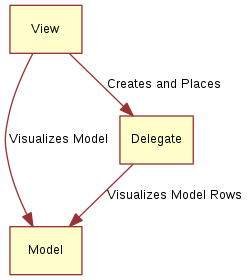
Model View Delegate 是 QML 应用程序的设计理念。
View: qml 的界面程序Delegate:展示数据的界面模板,从Model读取一项数据,然后显示在View上Model: 数据模型,是一个类似数组的容器,可以是一维或二维。
组件
Repeater
import QtQuick 2.5

Column {
    spacing: 2

    Repeater {
        // Model 数据: 0 ~ 10 的数字序列
        model: 10

        // Delegate 展示 model 的界面模板,通过 index 获取数据
        BlueBox {
            width: 120
            height: 32
            text: index
        }
    }
}
import QtQuick 2.5
Column {
spacing: 2
Repeater {
// Model 数据: 0 ~ 10 的数字序列
model: 10
// Delegate 展示 model 的界面模板,通过 index 获取数据
BlueBox {
width: 120
height: 32
text: index
}
}
}
Note
Repeater 适合展示数据量有限且不会修改的 model。对于大数据集的展示,则应使用 ListView、GridView、Flickable
ListView
- 高亮
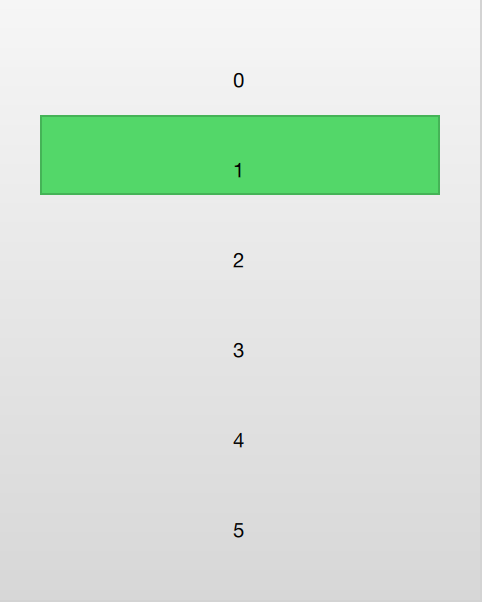
import QtQuick 2.5
import "../common"

Background {
    width: 240
    height: 300

    ListView {
        id: view
        anchors.fill: parent
        anchors.margins: 20

        // 只展示 width x height 范围内的内容
        clip: true
        model: 100

        delegate: numberDelegate
        spacing: 5

        // 高亮时,展示的组件
        highlight: highlightComponent
        focus: true
    }

    Component {
        id: highlightComponent

        GreenBox {
            width: ListView.view.width
        }
    }

    Component {
        id: numberDelegate

        Item {
            width: ListView.view.width
            height: 40

            Text {
                anchors.centerIn: parent

                font.pixelSize: 10

                text: index
            }
        }
    }
}
import QtQuick 2.5
import "../common"
Background {
width: 240
height: 300
ListView {
id: view
anchors.fill: parent
anchors.margins: 20
// 只展示 width x height 范围内的内容
clip: true
model: 100
delegate: numberDelegate
spacing: 5
// 高亮时,展示的组件
highlight: highlightComponent
focus: true
}
Component {
id: highlightComponent
GreenBox {
width: ListView.view.width
}
}
Component {
id: numberDelegate
Item {
width: ListView.view.width
height: 40
Text {
anchors.centerIn: parent
font.pixelSize: 10
text: index
}
}
}
}
- 首尾
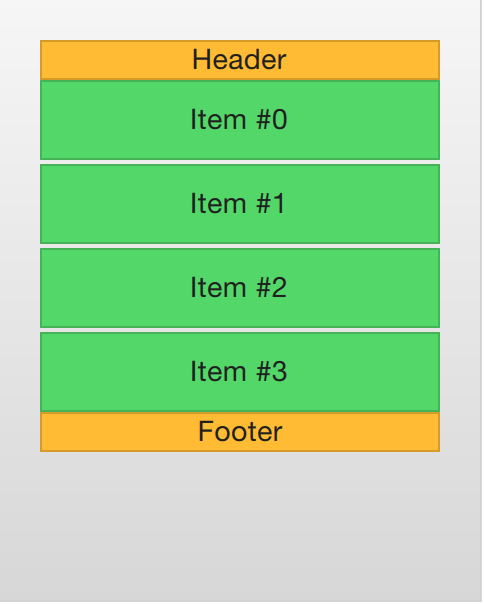
import QtQuick 2.5

Background {
    width: 240
    height: 300

    ListView {
        anchors.fill: parent
        anchors.margins: 20

        clip: true

        model: 4

        delegate: numberDelegate
        spacing: 2

        // 首
        header: headerComponent
        // 尾
        footer: footerComponent
    }

    Component {
        id: headerComponent

        YellowBox {
            width: ListView.view.width
            height: 20
            text: 'Header'

        }
    }

    Component {
        id: footerComponent

        YellowBox {
            width: ListView.view.width
            height: 20
            text: 'Footer'
        }
    }

    Component {
        id: numberDelegate

        GreenBox {
            width: ListView.view.width
            height: 40
            text: 'Item #' + index
        }
    }
}
import QtQuick 2.5
Background {
width: 240
height: 300
ListView {
anchors.fill: parent
anchors.margins: 20
clip: true
model: 4
delegate: numberDelegate
spacing: 2
// 首
header: headerComponent
// 尾
footer: footerComponent
}
Component {
id: headerComponent
YellowBox {
width: ListView.view.width
height: 20
text: 'Header'
}
}
Component {
id: footerComponent
YellowBox {
width: ListView.view.width
height: 20
text: 'Footer'
}
}
Component {
id: numberDelegate
GreenBox {
width: ListView.view.width
height: 40
text: 'Item #' + index
}
}
}
GridView
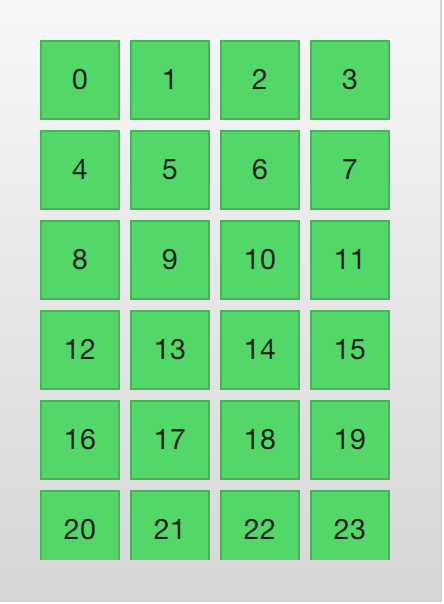
import QtQuick 2.5

Background {
    width: 220
    height: 300

    GridView {
        id: view
        anchors.fill: parent
        anchors.margins: 20

        clip: true

        model: 100

        // 单元格的大小
        cellWidth: 45
        cellHeight: 45

        // delegate 放在 cell 的左上角
        delegate: numberDelegate
    }

    Component {
        id: numberDelegate

        GreenBox {
            width: 40
            height: 40
            text: index
        }
    }
}
import QtQuick 2.5
Background {
width: 220
height: 300
GridView {
id: view
anchors.fill: parent
anchors.margins: 20
clip: true
model: 100
// 单元格的大小
cellWidth: 45
cellHeight: 45
// delegate 放在 cell 的左上角
delegate: numberDelegate
}
Component {
id: numberDelegate
GreenBox {
width: 40
height: 40
text: index
}
}
}
TableView
TableView {
    id: view
    anchors.fill: parent
    anchors.margins: 20

    // 可以控制两个方向
    rowSpacing: 5
    columnSpacing: 5

    clip: true

    // 展示 c++ 中定义的 table model
    model: tableModel

    delegate: cellDelegate

    Component {
        id: cellDelegate

        GreenBox {
            implicitHeight: 40
            implicitWidth: 40

            Text {
                anchors.centerIn: parent
                text: display
            }
        }
    }
}
TableView {
id: view
anchors.fill: parent
anchors.margins: 20
// 可以控制两个方向
rowSpacing: 5
columnSpacing: 5
clip: true
// 展示 c++ 中定义的 table model
model: tableModel
delegate: cellDelegate
Component {
id: cellDelegate
GreenBox {
implicitHeight: 40
implicitWidth: 40
Text {
anchors.centerIn: parent
text: display
}
}
}
}
回调函数
import QtQuick 2.11

Rectangle {
    width: 120
    height: 300

    gradient: Gradient {
        GradientStop { position: 0.0; color: "#f6f6f6" }
        GradientStop { position: 1.0; color: "#d7d7d7" }
    }

    ListModel {
        id: actionModel

        // 从  5.11 开始,可以将函数作为属性,存放到容器中
        ListElement {
            name: "Copenhagen"
            hello: function(value) { console.log(value + ": You clicked Copenhagen!"); }
        }
        ListElement {
            name: "Helsinki"
            hello: function(value) { console.log(value + ": Helsinki here!"); }
        }
        ListElement {
            name: "Oslo"
            hello: function(value) { console.log(value + ": Hei Hei fra Oslo!"); }
        }
        ListElement {
            name: "Stockholm"
            hello: function(value) { console.log(value + ": Stockholm calling!"); }
        }
    }

    ListView {
        anchors.fill: parent
        anchors.margins: 20

        clip: true

        model: actionModel

        delegate: actionDelegate
        spacing: 5

        focus: true
    }

    Component {
        id: actionDelegate

        Rectangle {
            width: ListView.view.width
            height: 40

            color: "#157efb"

            Text {
                anchors.centerIn: parent
                font.pixelSize: 10
                text: name
            }

            MouseArea {
                anchors.fill: parent
                // 调用每个 delegate 对应的回调函数
                onClicked: hello(index);
            }
        }
    }
}
import QtQuick 2.11
Rectangle {
width: 120
height: 300
gradient: Gradient {
GradientStop { position: 0.0; color: "#f6f6f6" }
GradientStop { position: 1.0; color: "#d7d7d7" }
}
ListModel {
id: actionModel
// 从 5.11 开始,可以将函数作为属性,存放到容器中
ListElement {
name: "Copenhagen"
hello: function(value) { console.log(value + ": You clicked Copenhagen!"); }
}
ListElement {
name: "Helsinki"
hello: function(value) { console.log(value + ": Helsinki here!"); }
}
ListElement {
name: "Oslo"
hello: function(value) { console.log(value + ": Hei Hei fra Oslo!"); }
}
ListElement {
name: "Stockholm"
hello: function(value) { console.log(value + ": Stockholm calling!"); }
}
}
ListView {
anchors.fill: parent
anchors.margins: 20
clip: true
model: actionModel
delegate: actionDelegate
spacing: 5
focus: true
}
Component {
id: actionDelegate
Rectangle {
width: ListView.view.width
height: 40
color: "#157efb"
Text {
anchors.centerIn: parent
font.pixelSize: 10
text: name
}
MouseArea {
anchors.fill: parent
// 调用每个 delegate 对应的回调函数
onClicked: hello(index);
}
}
}
}