
Fast API
FastAPI : 是一个用于构建 API 的现代、快速(高性能)的 web 框架,天生支持 Python 异步特性。
Starlette: 基于ASGI框架,提供异步能力Pydantic: 提供数据校验功能
安装
Terminal
$python.exe -m venv .env# 创建虚拟环境,用 conda 也行
$.\.env\Scripts\activate# windows 激活环境
$source ./.env/bin/activate# linux 激活环境
(.env) triangle@LEARN:~$ pip list # 查看安装了哪些包
(.env) triangle@LEARN:~$ pip install fastapi
(.env) triangle@LEARN:~$ pip install "uvicorn[standard]"
(.env) triangle@LEARN:~$ deactivate # 退出激活环境
$rm -rf .env# 直接删除文件夹即可删除虚拟环境
如果在内网机中使用,安装离线版的 FastAPI 才能离线使用 Swagger UI
Terminal
$pip install fastapi-offline
from fastapi_offline import FastAPIOffline

# 使用 FastAPIOffline 代替 FastAPI
# app = FastAPI()
app = FastAPIOffline()
from fastapi_offline import FastAPIOffline
# 使用 FastAPIOffline 代替 FastAPI
# app = FastAPI()
app = FastAPIOffline()
hello world
# hello.py

from fastapi import FastAPI

app = FastAPI()

# async : 声明接口使用异步
@app.get("/hello")
async def hello_world():
    return {'message' : 'ok'}
# hello.py
from fastapi import FastAPI
app = FastAPI()
# async : 声明接口使用异步
@app.get("/hello")
async def hello_world():
return {'message' : 'ok'}
Terminal
$uvicorn.exe hello:app --reload# 启动服务
INFO: Will watch for changes in these directories: ['E:\\testspace\\fastapi']
INFO: Uvicorn running on http://127.0.0.1:8000 (Press CTRL+C to quit)
INFO: Started reloader process [22708] using WatchFiles
INFO: Started server process [13696]
....
使用 http://127.0.0.1:8000/docs#/ 便能访问 Swagger UI
浏览服务的所有接口。
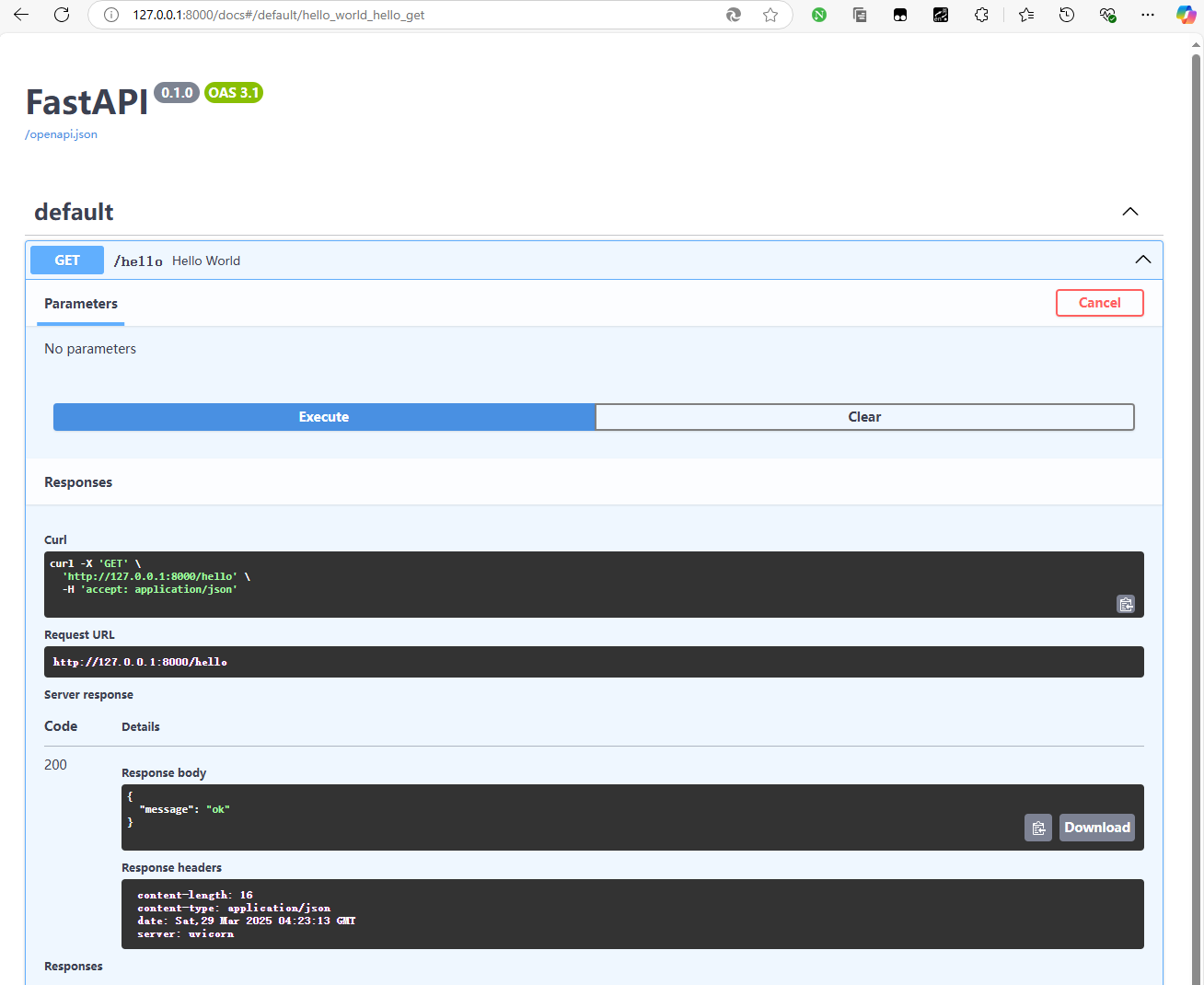
除了使用命令行启动 FastAPI ,也可以通过代码启动
import uvicorn
from fastapi import FastAPI

app = FastAPI()

# async : 声明接口使用异步
@app.get("/hello")
async def hello_world():
    return {'message' : 'ok'}

if __name__ == '__main__':

    # 执行与 FastAPI 无关的初始化
    init()

    # 启动 FastAPI
    uvicorn.run('hello:app', host='127.0.0.1', port=8000, reload=True, workers=1)
import uvicorn
from fastapi import FastAPI
app = FastAPI()
# async : 声明接口使用异步
@app.get("/hello")
async def hello_world():
return {'message' : 'ok'}
if __name__ == '__main__':
# 执行与 FastAPI 无关的初始化
init()
# 启动 FastAPI
uvicorn.run('hello:app', host='127.0.0.1', port=8000, reload=True, workers=1)
生命周期
通过 lifespan 可以在 FastAPI 启动成功后与准备关闭前做一些处理。
from contextlib import asynccontextmanager

@asynccontextmanager
async def lifespan(app: FastAPI):
    # app 启动
    handle_init()

    yield

    # app 关闭
    handle_destroy()

app = FastAPI(lifespan=lifespan)
from contextlib import asynccontextmanager
@asynccontextmanager
async def lifespan(app: FastAPI):
# app 启动
handle_init()
yield
# app 关闭
handle_destroy()
app = FastAPI(lifespan=lifespan)
依赖注入
使用 Depends 可以在进行业务处理前进行一些初始化操作
from fastapi import FastAPI, Depends

app = FastAPI()

# 定义一个依赖项,可以实现公用
def get_database_connection():
    # 建立或获取数据库连接
    connection = ...  # 替换为实际的数据库连接代码
    return connection

@app.get("/")
async def read_root(connection=Depends(get_database_connection)):
    # 使用数据库连接进行操作
    return {"message": "Hello World!"}

@app.get("/user")
async def read_user(connection=Depends(get_database_connection)):
    # 使用数据库连接进行操作
    return {"message": "Hello World!"}
from fastapi import FastAPI, Depends
app = FastAPI()
# 定义一个依赖项,可以实现公用
def get_database_connection():
# 建立或获取数据库连接
connection = ... # 替换为实际的数据库连接代码
return connection
@app.get("/")
async def read_root(connection=Depends(get_database_connection)):
# 使用数据库连接进行操作
return {"message": "Hello World!"}
@app.get("/user")
async def read_user(connection=Depends(get_database_connection)):
# 使用数据库连接进行操作
return {"message": "Hello World!"}
接口测试
import pytest
from fastapi.testclient import TestClient

# 使用该方式创建客户端,才能正确启动 tortoise orm
@pytest.fixture(scope="module")
def test_client():
with TestClient(app) as client:
    yield client

def test_demo(test_client:TestClient):
    resp = test_client.get(
        "/demo"
    )
import pytest
from fastapi.testclient import TestClient
# 使用该方式创建客户端,才能正确启动 tortoise orm
@pytest.fixture(scope="module")
def test_client():
with TestClient(app) as client:
yield client
def test_demo(test_client:TestClient):
resp = test_client.get(
"/demo"
)
Note
测试 async 接口时,@pytest.mark.asyncio 与 @pytest.mark.repeat 可能存在兼容问题