
介绍
Squirrel
是比 Omaha 更轻量化的自动更新框架,基于 NuGet
包管理器,通过一系列的工具和动态库实现 Windows 应用程序的安装和更新。目前 Electron 使用 Squirrel 管理软件更新。
下载
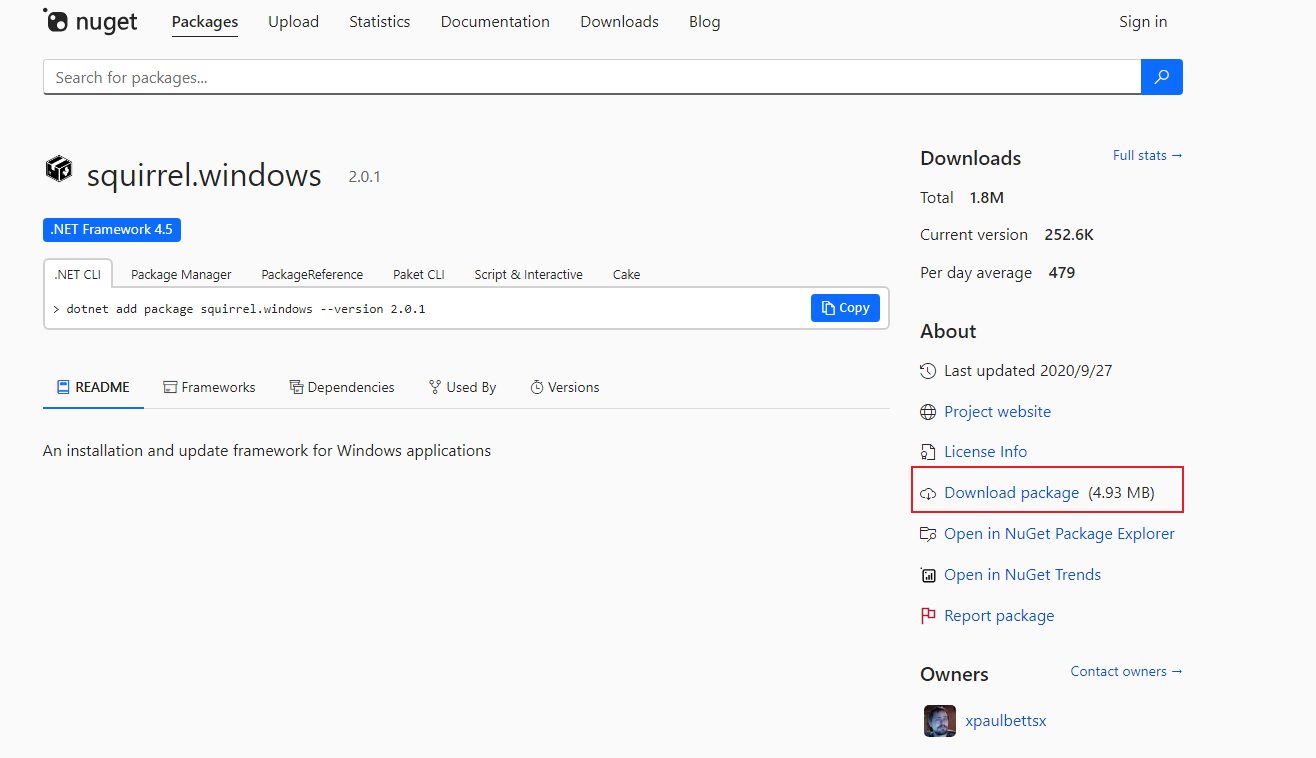
Squirrel 的二进制编译版本不在 github ,而需要到 NuGet 仓库进行下载 。
- 下载
.nupkg包文件,解压即可 - 使用 dotnet 命令行进行安装
使用
-
由于非
c#程序无法集成官方提供的库,程序只能开启子进程调用 Update.exe 实现更新程序管理Terminaltriangle@LEARN:~$ Update.exeManages Squirrel packagesCommands--install=VALUE Install the app whose package is in the specifieddirectory--uninstall Uninstall the app the same dir as Update.exe--download=VALUE Download the releases specified by the URL andwrite new results to stdout as JSON--checkForUpdate=VALUE Check for one available update and writes newresults to stdout as JSON--update=VALUE Update the application to the latest remoteversion specified by URL--releasify=VALUE Update or generate a releases directory with agiven NuGet package--createShortcut=VALUE Create a shortcut for the given executable name--removeShortcut=VALUE Remove a shortcut for the given executable name--updateSelf=VALUE Copy the currently executing Update.exe into thedefault locationOptions:-h, -?, --help Display Help and exit-r, --releaseDir=VALUE Path to a release directory to use with releasify-p, --packagesDir=VALUE Path to the NuGet Packages directory for C# apps--bootstrapperExe=VALUEPath to the Setup.exe to use as a template-g, --loadingGif=VALUE Path to an animated GIF to be displayed duringinstallation-i, --icon=VALUE Path to an ICO file that will be used for iconshortcuts--setupIcon=VALUE Path to an ICO file that will be used for theSetup executable's icon-n, --signWithParams=VALUE Sign the installer via SignTool.exe with theparameters given-s, --silent Silent install-l, --shortcut-locations=VALUEComma-separated string of shortcut locations, e.g.'Desktop,StartMenu'--no-msi Don't generate an MSI package--no-delta Don't generate delta packages to save time--framework-version=VALUESet the required .NET framework version, e.g.net461--msi-win64 Mark the MSI as 64-bit, which is useful inEnterprise deployment scenariostriangle@LEARN:~$ Update.exe --update http://localhost:8080/releases // 检测更新triangle@LEARN:~$ Update.exe --download http://localhost:8080/releases // 下载 -
使用
nuget将应用程序打包成.nupkg,必须使用lib/net45文件夹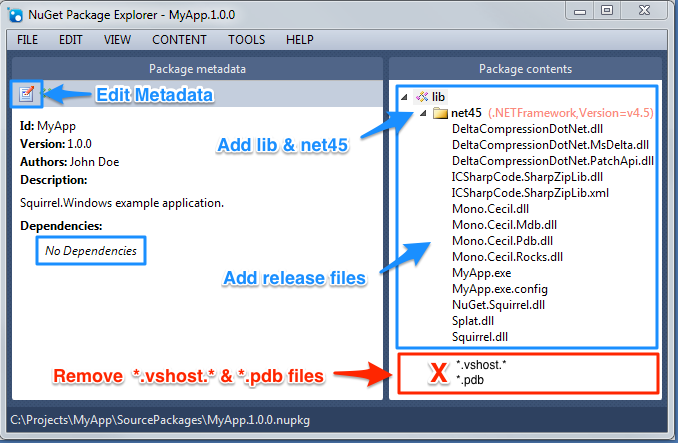
-
使用
Squirrel工具将打包好的.nupkg文件发布项目Terminaltriangle@LEARN:~$ Squirrel --releasify MyApp.1.0.0.nupkgtriangle@LEARN:~$ tree ..├── MyPackage.1.0.10.nupkg # 使用 nuget 打包└── Releases # 部署文件包├── MyPackage-1.0.10-full.nupkg # 全量包├── RELEASES # 客户端更新时需要下载的文件├── Setup.exe # 环境检测,安装程序后,并启动└── Setup.msi # 软件安装器 -
将上述生成的发布项目
Releases文件部署到 http 服务上,并提供访问链接TXThttp://localhost:8080/releaseshttp://localhost:8080/releases -
用户使用
Setup.exe安装程序,程序所在目录%LocalAppData%\MyPackageTerminaltriangle@LEARN:~$ tree ..├── app-1.0.10 # 对应版本的软件│ └── demo.exe├── packages # 包信息│ ├── MyPackage-1.0.10-full.nupkg│ ├── RELEASES│ └── SquirrelTemp└── Update.exe # 更新程序,用来管理程序具体安装,更新细节 -
程序内部调用 Update.exe 实现更新检测、更新下载、更新安装等